
For most teams, deploying a change and releasing it to users are the same event. You merge, the pipeline runs, and by the time it finishes every user is on the new code. That is one button making two decisions, and it is the reason so much effort goes into being certain before a deploy instead of being able to react after one.
A feature flag separates those two decisions, so the code can sit in production switched off while you decide separately who sees it.
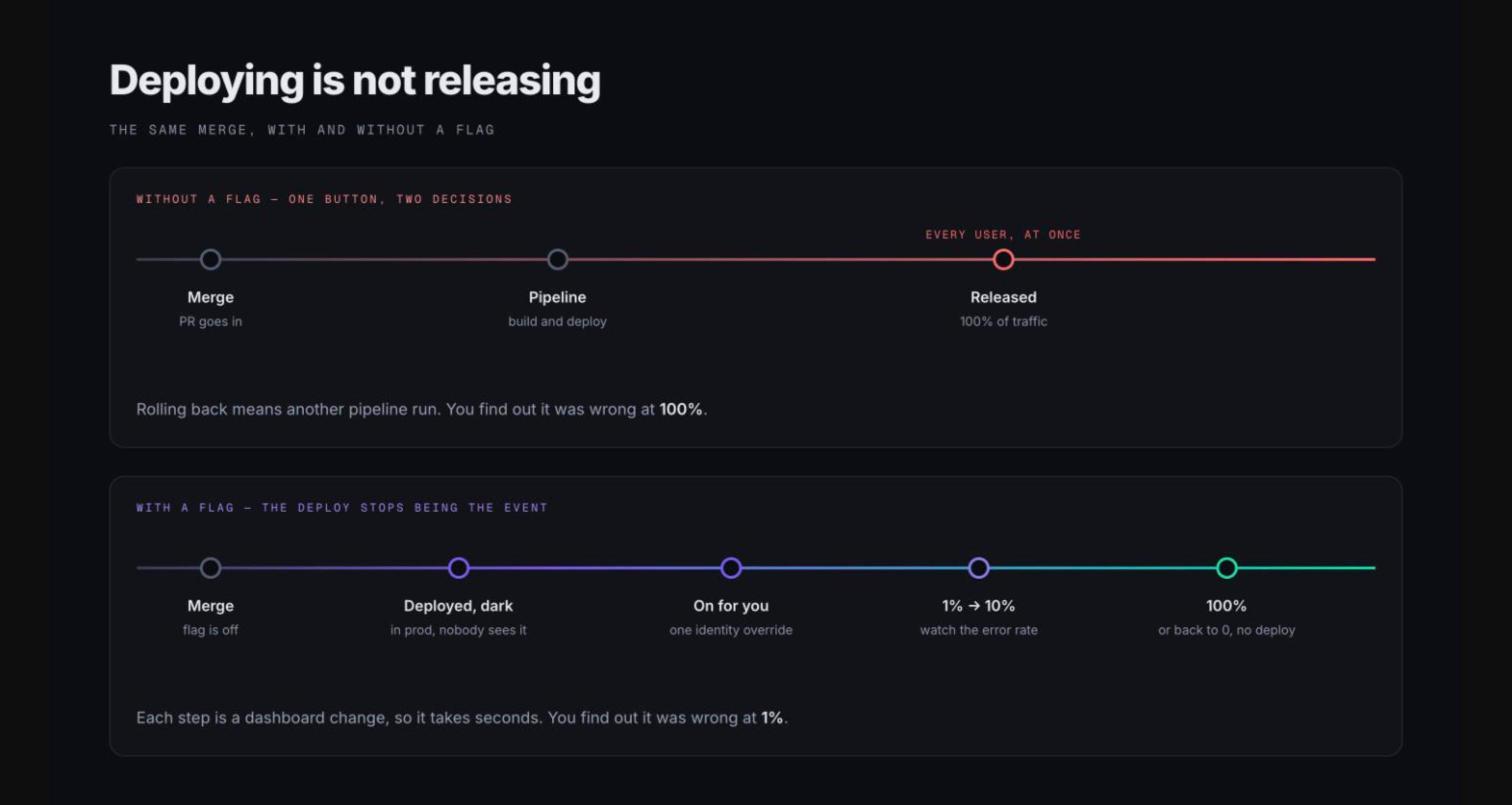
The second row is the part that changes how a team works. Every step after the deploy is a dashboard change rather than a release, which means it takes seconds and it can be undone just as quickly.
What flags end up being used for
Once flags are in a codebase they get used for more than hiding half-finished features, and the four jobs below cover almost everything you will see in practice.
- You can merge unfinished work: A half-built feature behind a flag that is off is invisible in production, so nobody has to keep a long-lived branch open for three weeks and nobody has to do the merge that comes with it.
- You can roll out slowly: On for you, then the team, then one percent, then everyone. When something is wrong you usually discover it at one percent, which is a far cheaper place to discover it.
- You can turn it off without a deploy: This is the one people reach for at two in the morning, because flipping a flag is a rollback that takes ten seconds and involves no revert commit and no waiting on a build.
- You can show different things to different people: Beta users, a single customer, one region, internal staff. The rule lives on the flag, so your targeting sits in one place instead of being scattered through conditionals in four services.
Five flags from one real project
Here is every flag in Overlap, a small meeting planner we built to demo Flagsmith, and only one of them is a feature being hidden.
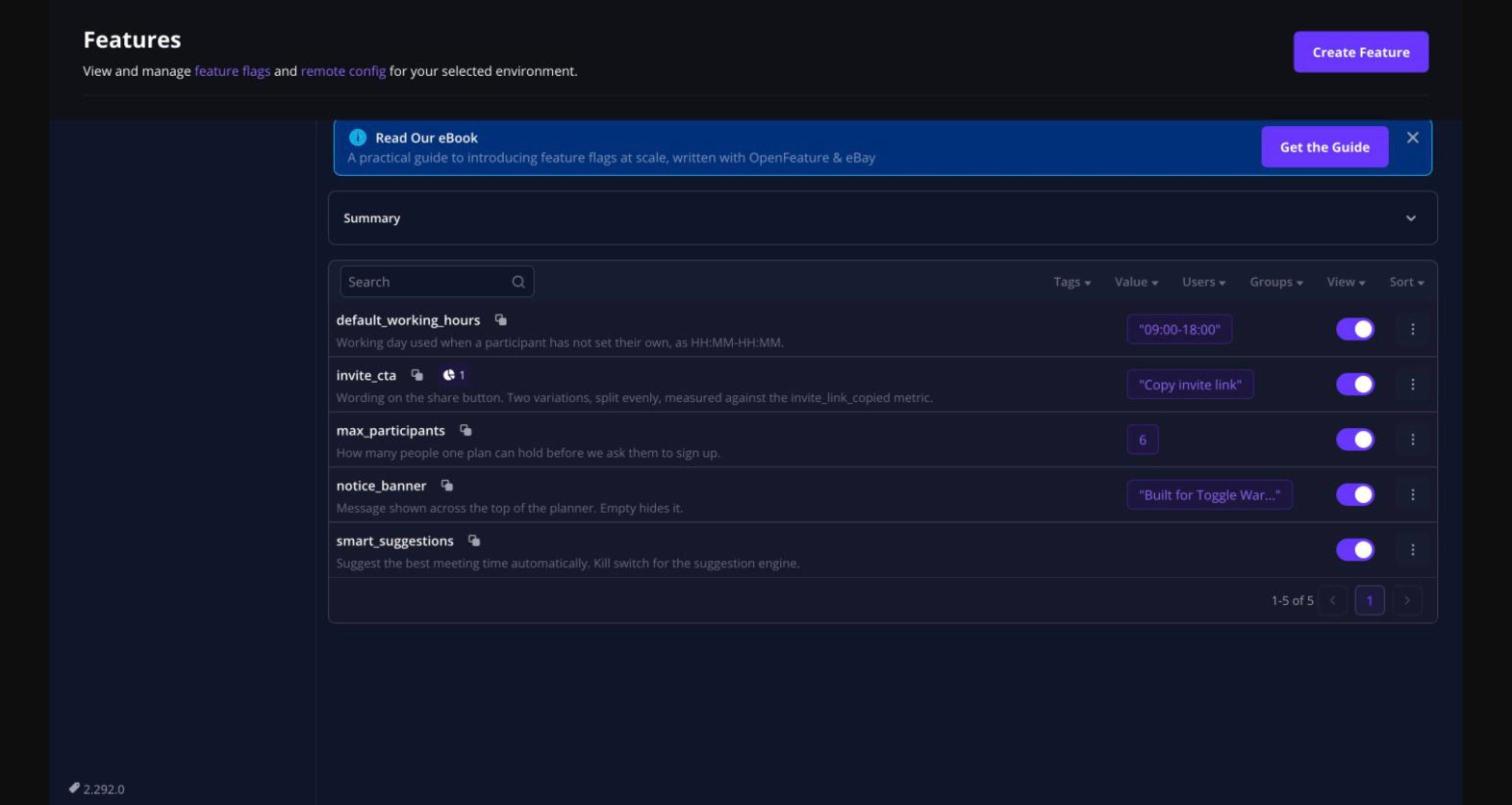
smart_suggestionsis the classic case, a kill switch over the suggestion engine. If it starts recommending 3 AM meetings, somebody flips it off and nobody waits for a deploy.max_participantsis the number 6, which decides how many people a plan holds before we ask them to sign up.default_working_hoursis the string09:00-18:00, used when a participant has not set their own.notice_bannerholds whatever text runs across the top of the planner, and an empty value hides the banner entirely.invite_ctais a multivariate flag with an experiment running on it, which is the subject of the last section.
Three of those five are not features at all. They used to be constants, or environment variables, or rows in a settings table that needed a migration to change, and they are now values somebody can edit without touching the code. That half of flagging rarely makes it into the pitch, and it is the half most teams use every day.
Reading a flag
from flagsmith import Flagsmith

flagsmith = Flagsmith(environment_key="YOUR_ENV_KEY")
flags = flagsmith.get_environment_flags()

if flags.is_feature_enabled("smart_suggestions"):
    suggest_best_time(plan)
For the flags that carry a value rather than a state, flags.get_feature_value("max_participants") returns whatever is stored against them, which can be a string, a number, or a JSON blob you parse on the way out.
Where that value comes from
This is worth understanding before you scatter flag checks through a request path, because it decides whether each check is free or costs you a network round trip.
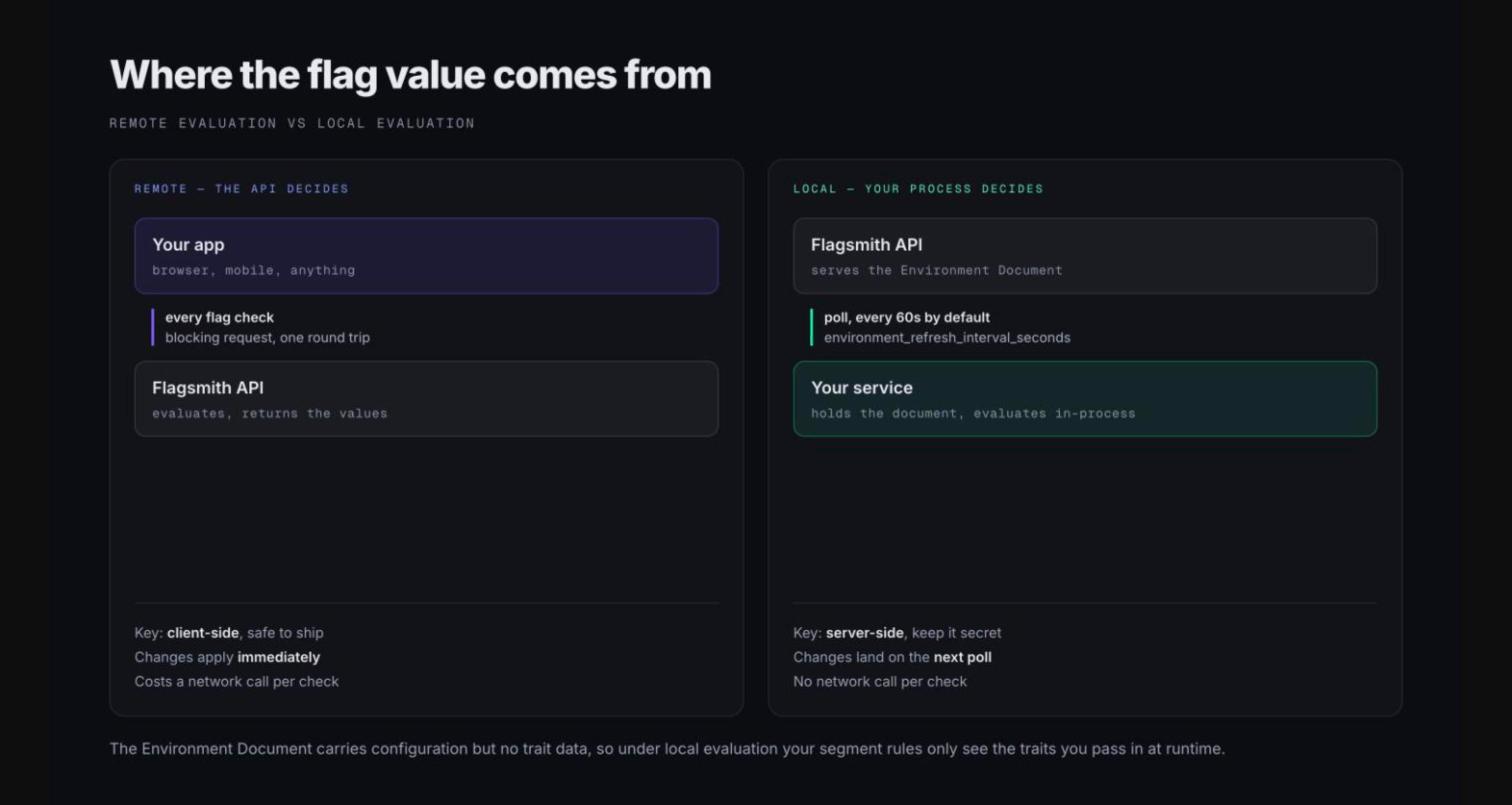
Remote evaluation is the default, and it is what you want in a browser or a mobile app where handing the client your entire configuration would be a bad idea. Local evaluation suits backend services, because the SDK pulls the Environment Document once at startup and then answers every flag check in-process.
flagsmith = Flagsmith(
    environment_key="YOUR_SERVER_SIDE_KEY",
    enable_local_evaluation=True,
    environment_refresh_interval_seconds=15,
)
Two consequences follow from that configuration, and both of them catch people out.
- The key is a different one: Local evaluation needs a server-side environment key rather than the client-side key, because the Environment Document is your whole configuration and it has no business being in a browser bundle. Treat it the way you would treat a database password.
- Changes arrive on the next poll: A flag you flip in the dashboard reaches a locally evaluating service up to a minute later with the defaults, which is irrelevant for a gradual rollout and uncomfortable for a kill switch during an incident. Turn the interval down on the services where that matters.
There is a third behaviour that is easier to miss. The Environment Document carries configuration but no trait data, so under local evaluation your segment rules are evaluated only against the traits you pass in at runtime. Targeting that relies on traits saved against an identity earlier through the API will quietly behave differently once you switch modes.
Targeting
A flag that resolves the same way for everybody is really just a config value, and targeting is where the setup starts earning its keep.
identity_flags = flagsmith.get_identity_flags(
    identifier="user-8213",
    traits={"plan": "pro", "country": "IN"},
)
The identifier says who this is and the traits say what you know about them. Segments turn those traits into reusable rules, so a condition like "pro accounts in India" is written once in the dashboard instead of being re-expressed in every service that cares about it. You can also override a single identity directly, which is how one specific customer gets early access without anybody inventing a trait to describe them.
When Flagsmith is unreachable
Your code needs an answer for this that is not a stack trace, and the SDK takes a handler that is used whenever the API does not respond or you ask for a flag it does not recognise.
from flagsmith.models import DefaultFlag

def default_flag_handler(feature_name: str) -> DefaultFlag:
    if feature_name == "smart_suggestions":
        return DefaultFlag(enabled=True, value=None, feature_name=feature_name)
    return DefaultFlag(False, None)
Pass that as default_flag_handler on the constructor. The question to ask for each flag is which side is safe when you know nothing, and the answer is not always off, because a kill switch guarding something load-bearing usually wants to default on while a half-built feature wants to default off. Decide it while you are writing the code, since deciding it during an incident is how teams discover their defaults were never set. For a fully disconnected setup there is offline_mode with an offline_handler that reads the environment from a file.
The multivariate part
Coming back to invite_cta, that flag is not on or off. It holds two values with a weight on each, and every visitor gets one of them, so the share button in Overlap reads either "Copy invite link" or "Get everyone's times". Once a flag can do that, it can answer a question instead of only shipping a change.
flagsmith = Flagsmith(environment_key="YOUR_ENV_KEY", enable_events=True)

flag = flagsmith.get_experiment_flag("invite_cta", identifier=visitor_id)
render_share_button(flag.value)

# when they actually copy it
flagsmith.track_event("invite_link_copied", identifier=visitor_id)
That identifier carries more weight than it looks like it does. Assignment is derived from it, so the same visitor gets the same variation on every request and across sessions, and if you pass a fresh UUID each time you have silently reassigned everybody on every page load. The traffic split will still look immaculate while the results underneath it become noise.
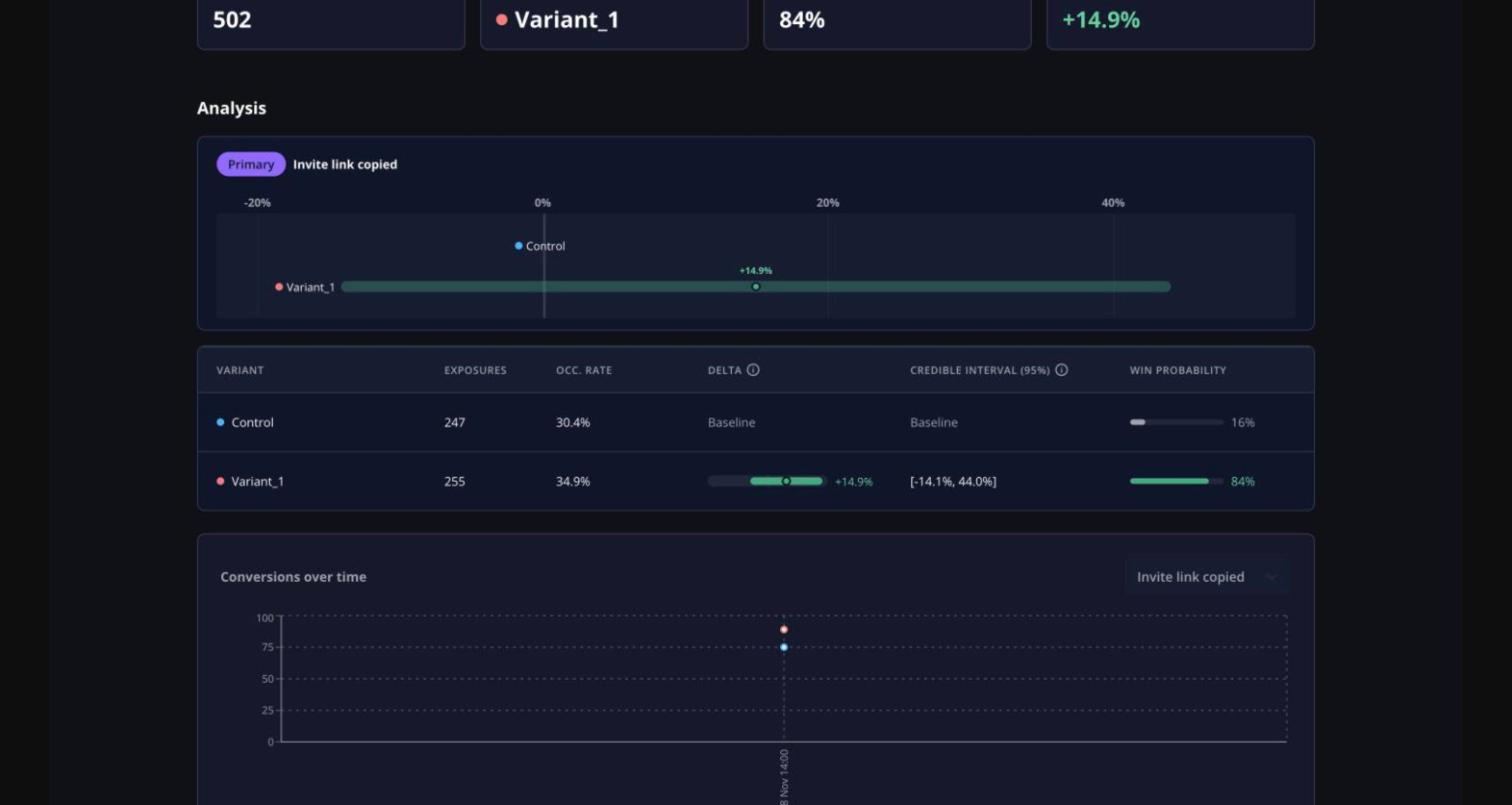
That is the same experiment after a few hundred sessions. Flagsmith runs a Bayesian engine over the events it collects, so rather than a pass or a fail you get a win probability for each variation.
The number worth reading next to it is the credible interval. Variant_1 is ahead by 14.9% with 84% probability, which sounds like a result until you notice the interval runs from -14.1% to +44.0% and therefore crosses zero. The data is still consistent with that variation being worse, and the honest conclusion is that there is not yet enough traffic to call it. Shipping on a number like that is the same guessing you were trying to get away from, only with better graphics in front of it.
Running it yourself
Flagsmith is open source, so you can either start on their free cloud tier or run the whole platform locally.
curl -o docker-compose.yml https://raw.githubusercontent.com/Flagsmith/flagsmith/main/docker-compose.yml
docker-compose -f docker-compose.yml up
There are SDKs for JavaScript, React, Python, Java, Node.js, Go and Flutter. Around the flags themselves you get environments, segments, per-identity overrides, scheduled changes, change requests for flags that need a second pair of eyes, and an audit log of who flipped what. The Experimentation docs cover the flag, metric and experiment setup, and there is a setup prompt for coding agents if you would rather have one wire it in and then read back what it did. The whole loop on a real app, including the experiment above, is written up in how to run a real A/B test with Flagsmith Experimentation.
Two things that bite later
- Flags outlive their purpose: A codebase carrying two hundred flags, most of them permanently on, reads worse than one carrying none, because every flag is a branch somebody has to hold in their head while reading. Deleting the dead branch is part of finishing the rollout rather than cleanup you will get to later.
- Where you fetch them matters: Build the client once at startup and reuse it, because constructing an SDK client per request or calling the API inside a loop turns a free check into a latency problem that only shows up under load.
Toggle Wars
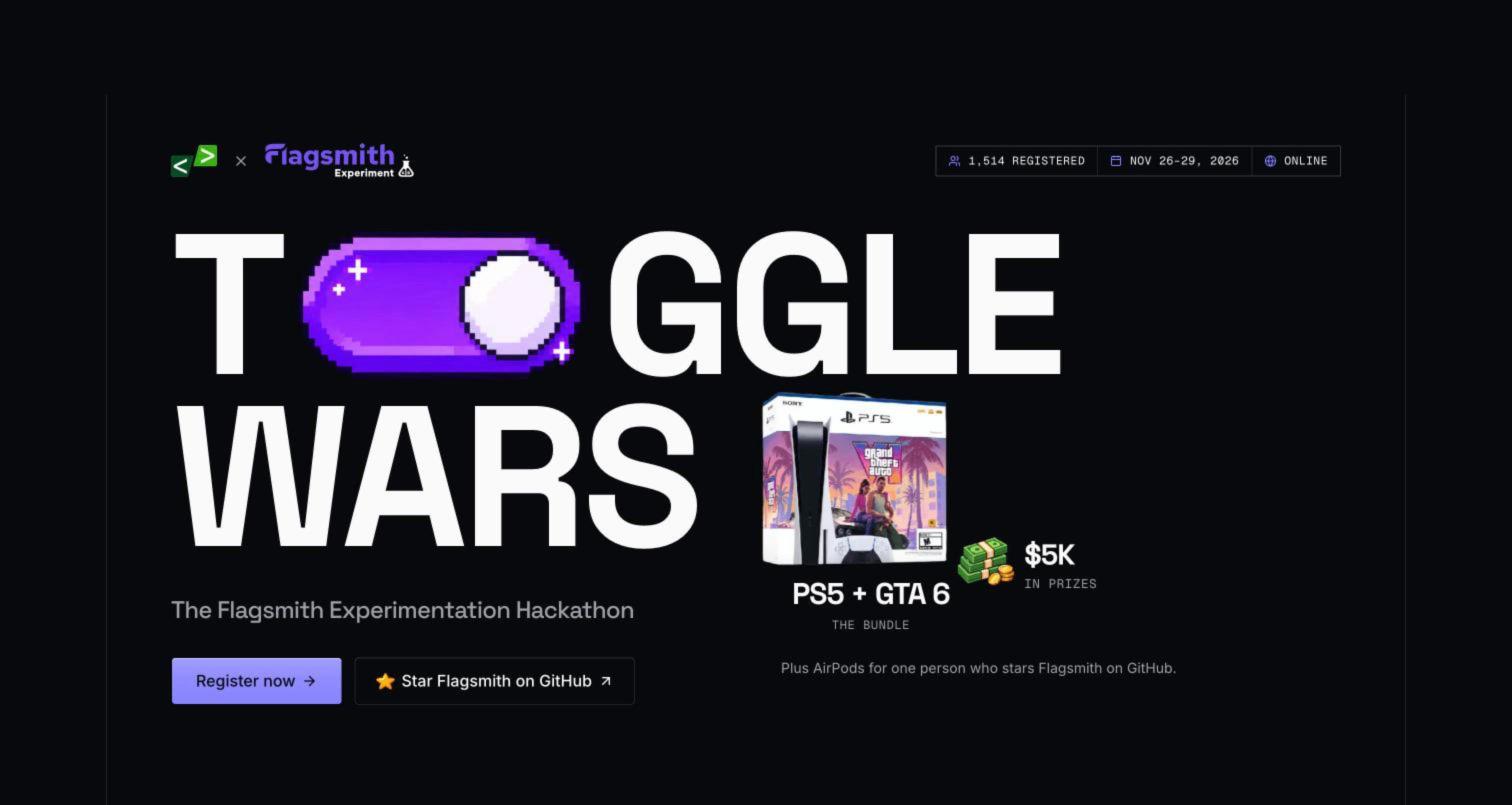
We are running Toggle Wars from 26 to 29 November, online and free, solo or in a team. Hacking starts at 8 AM IST on Thursday the 26th and submissions close at 8 PM IST on Sunday the 29th.
The brief is to build something with Flagsmith and use Experimentation to find out which version of it works better. There are three tracks: an app with a real A/B test running on it takes $2,000, an agent or tool that drives Flagsmith for you takes $1,000, and building on self-hosted Flagsmith takes a PS5 and GTA 6 bundle. One person who stars Flagsmith on GitHub wins a pair of AirPods.
More than a thousand people have registered already, and the Toggle Wars page has the rest of the detail.


