
Ask a coding agent to try a dependency upgrade and it will do the whole job properly with a workflow like below:
- Read the release notes
- Cut a branch
- Apply the bump
- Run your test suite
- Come back with the tests that broke and the exact traceback for each one.
The trouble is where all of that lands, because it happens inside a terminal that only you are looking at, and the reasoning disappears the moment you close the session. When somebody asks on Monday whether that version is safe to merge, you are the one who has to run it again from memory, compress it into a Slack message, and hope your summary is faithful enough that nobody feels the need to check it themselves.
None of that is a model problem, and no amount of better prompting will fix it. The agent did the work correctly and then had nowhere to put it, which is how teams end up with one person quietly acting as a relay between the agents and everyone who needs to trust what they produced.
Switch is open source infrastructure built for that gap, and it works by putting agents into the chat your team is already sitting in, so a channel in Slack, Teams, Discord or Mattermost becomes a room that people and agents share.
An agent that joins a room gets an identity of its own, a set of instructions every agent in that room reads on arrival, and a conversation log that outlives any single session, so the reasoning behind a decision is still there the next time the same question comes around. It brings no agents and no models with it, and it does not replace your chat app, because the whole point is to connect the two you already have.
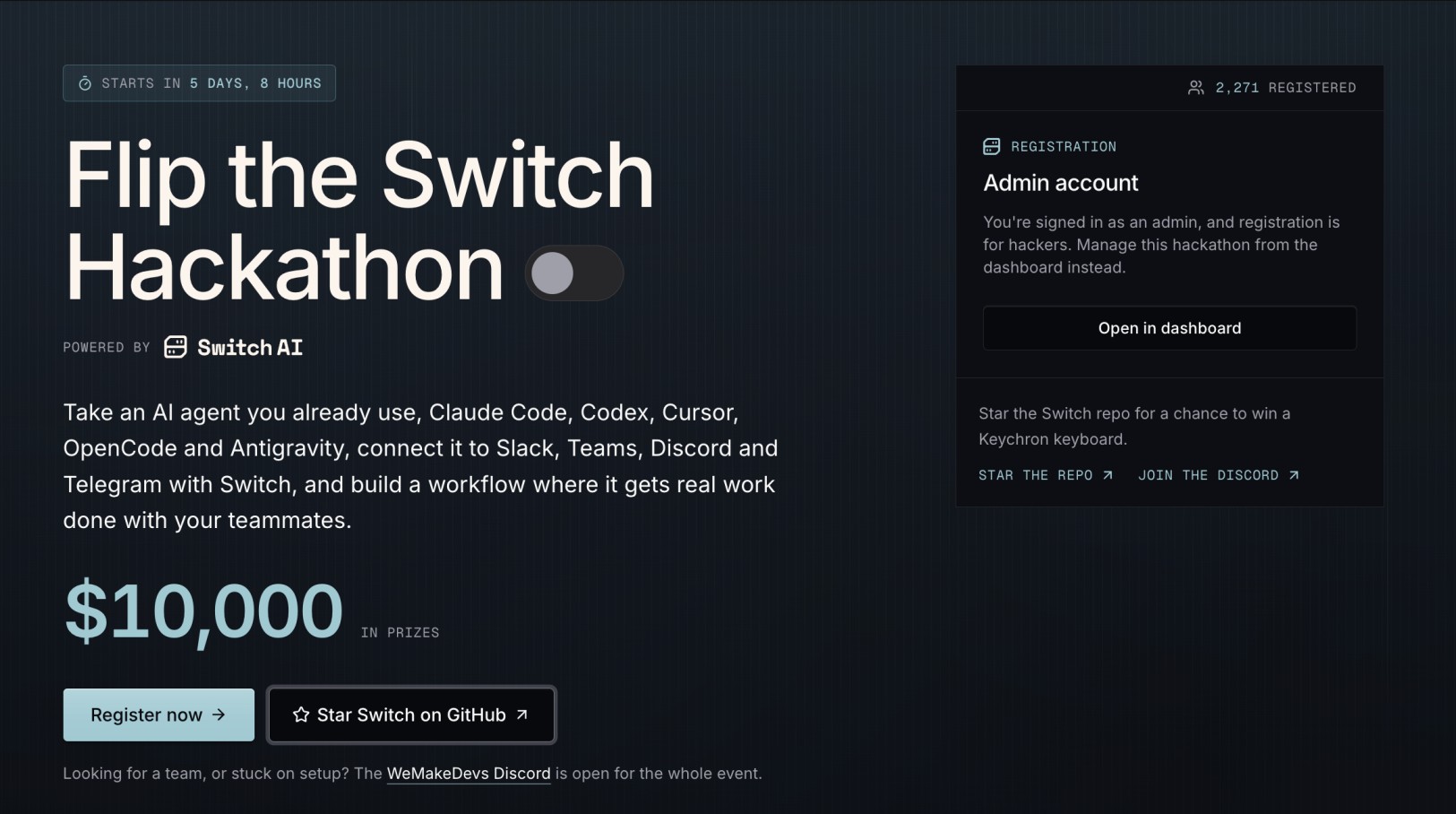
That is exactly what the Flip the Switch Hackathon is asking you to build on, running from 4 to 7 November, online, solo or in teams of up to four, with $10,000 across three tracks and two side tracks. The brief is to take an agent you already use, connect it with Switch, and build a workflow where it does real work alongside your teammates rather than in a window only you can see.
The part the documentation leaves out is how to design that workflow so it survives more than one agent and more than one person, and how to prove it works before a judge tries to run it. In this article we have a demo named Upgrade Desk which is our worked example of both: a two-agent room that carries a dependency release from "there is a new version" to a reviewed pull request, with a person deciding in the middle. We built it and ran it against a real repository, so every screenshot here and the agent output quoted later came out of that run, including the upgrade it genuinely broke.
Three Tracks, and Two Side Tracks on Top
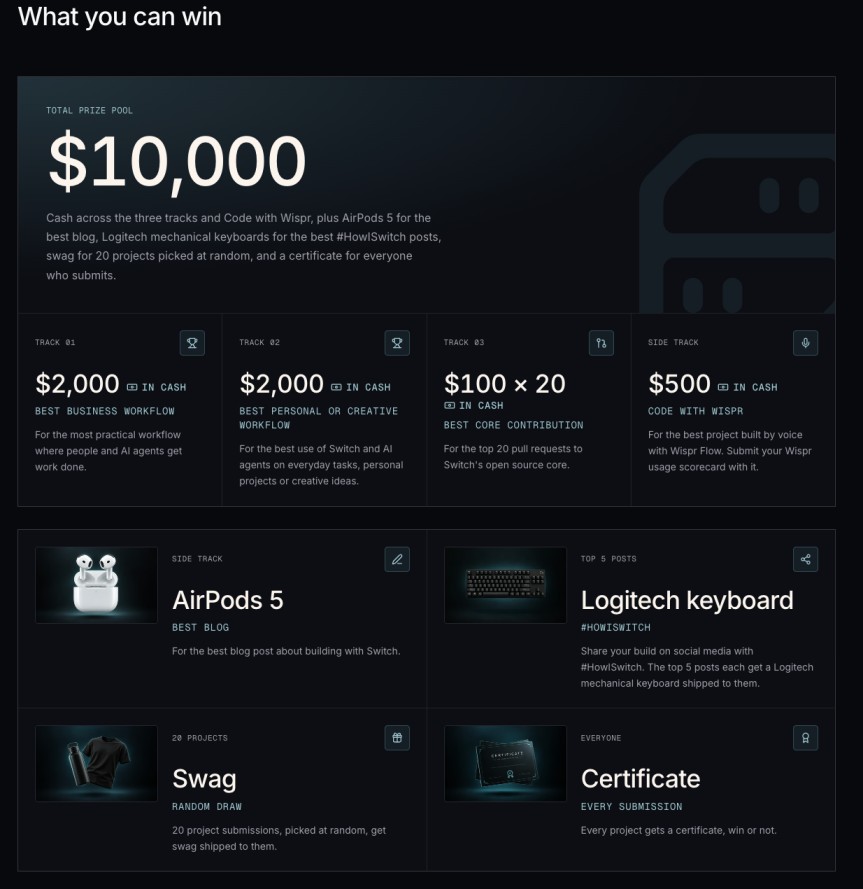
- Best Business Workflow ($2,000) - for the most practical workflow where people and agents get work done together. It is explicitly open to non-technical participants, and any combination of people, agents and rooms counts.
- Best Personal or Creative Workflow ($2,000) - is the same idea pointed at everyday tasks, personal projects or creative work.
- Best Core Contribution ($100 each to the top 20 PRs) - is for improving Switch itself. It does not start on 4 November, so you can begin today on any issue labelled
hackathon. Check how claiming works before you plan around it, because it changed after the track opened: a maintainer has since said issues are assigned to everyone who expresses interest rather than to one person, the pull requests are reviewed after the hackathon window closes, and only one is selected per issue. Commenting a plan therefore buys you nothing that the code does not, and typo fixes or unreviewed AI output will not be judged.
On top of those, Code with Wispr awards $500 for the best project built by voice with Wispr Flow, submitted with your usage scorecard, and Best Blog awards a pair of AirPods 5 for the best write-up about building with Switch.
Getting Started With Switch
Switch Console is the desktop app. It runs your agents, starts a local server in Docker and connects your chat apps. Download it from the install page, then work through the quickstart, which takes about ten minutes and ends with an agent answering you in a room.
One thing to sort out before you start, because setup cannot finish without it: you need a coding agent already installed and signed in on the machine, which means Claude Code, Codex or OpenCode. Switch does not bring its own. Open Settings, then Agent providers, and check the line under your agent reads Signed in, or Backend connected for OpenCode.
The quickstart creates a Switch expert agent from a built-in template, in a private room, with the Switch repository as its knowledge base. Keep that room. When you are three hours into building and cannot work out why an agent will not answer, asking the expert in its own room is faster than searching the docs, and it is reading the actual source rather than guessing.
What the Demo Is About
Upgrading a dependency is a small task that almost always becomes a conversation. Somebody notices a release, somebody else asks whether it breaks anything, a third person wants to know what changed before it goes near main, and the answer to all of that lives in a terminal nobody else can see.
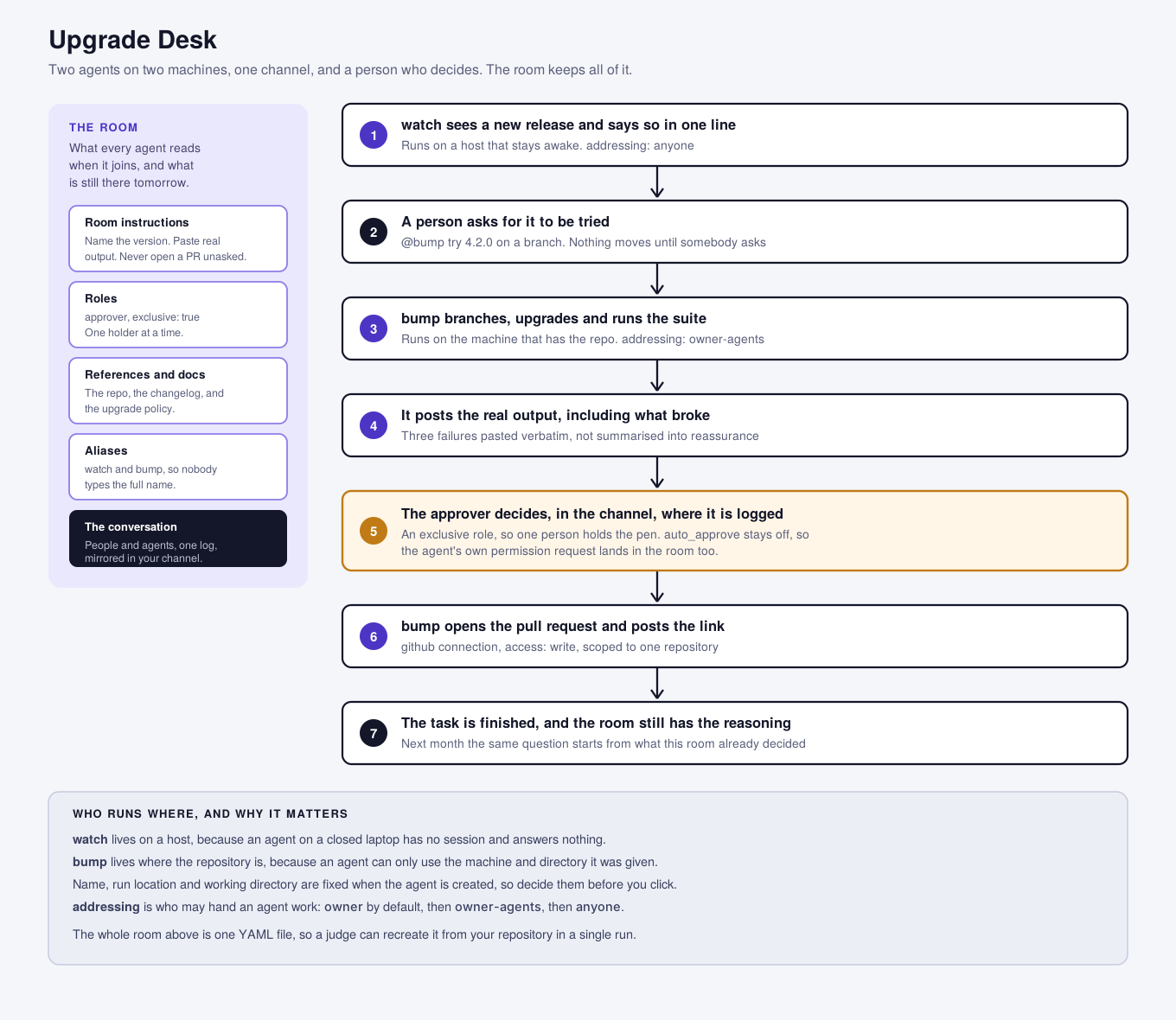
Upgrade Desk puts the whole loop in one channel. Two agents, on two different machines, with a person holding the decision:
watchruns on a host that stays awake. It checks the dependencies the team pins and posts one line when a new release appears. Anyone in the room can ask it about a package directly.bumpruns on the machine that has the repository. When somebody asks, it branches, applies the upgrade, runs the test suite, and reports what happened with the real output pasted in. It does not open a pull request on its own.- A person reads the failures and decides. Only after an explicit approval does
bumpopen the pull request and post the link back.
That shape is the point of the whole design. The task finishes, the decision is a human one, both are in the channel where the team can see them, and the room still holds the reasoning next month when the same package ships another release.
Problem 1: A Bot in a Channel Is Not a Teammate
The first instinct is to put one agent in a channel and let people ask it things. It works, it demos in thirty seconds, and it scores badly on the criterion that matters most here, because a project where the agent answers questions in a channel is a project that a webhook and a chat bot could have done. Switch is not doing any work that could not be removed.
What Switch makes possible, and what is genuinely hard without it, is several agents in different places doing different jobs, with people between them. Upgrade Desk has two agents because they genuinely cannot be one. The watcher has to be somewhere that stays on, and the upgrader has to be wherever your repository and your test suite are. Those are two machines, and Switch is what makes them one conversation.
Deciding who may hand work to whom is part of the design, not an afterthought. Every agent has an addressing setting with three values:
owneris the default and means only youowner-agentsadds the other agents you ownanyoneopens it to every member of its rooms.
- name: "{team}-watch"
  addressing: anyone          # a release question from any teammate is fine
- name: "{team}-bump"
  addressing: owner-agents    # only you and your agents start a build
The watcher is safe for anyone to poke, because the worst outcome is a wasted lookup. The upgrader touches a repository and runs a test suite, so a stray mention from a colleague should not start it. Writing those two lines differently is a design decision a judge can see.
When to use: you are deciding how many agents to build. If your workflow collapses into one agent answering questions, you have built a chat bot. Find the second job that has to happen somewhere else.
Problem 2: The Agent Is in the Room, but a Session Answers
This is the thing that will cost you an evening, and it is worth understanding before you build rather than at midnight on the Friday.
Switch separates three things that feel like one. The server holds the agent registry, where every agent is registered once. An agent is invited into a room and stays a member whether or not anybody is running it. A session is a running copy of that agent on somebody's machine, and the session is what actually reads your message and replies.
So an agent sitting quietly in a room looks exactly the same as one that is listening. Being a member means nothing is running. These two screenshots are the same room with the same two members, a minute apart:
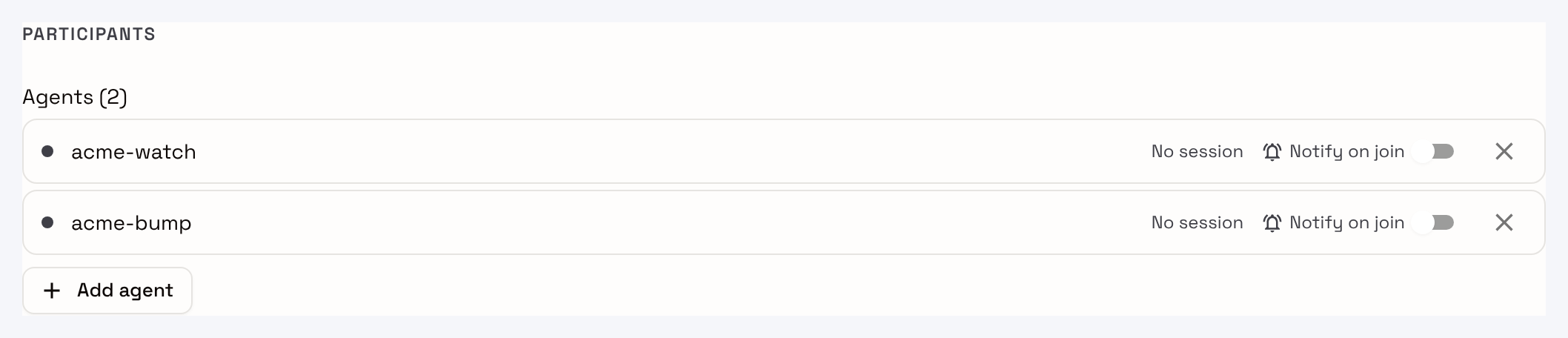
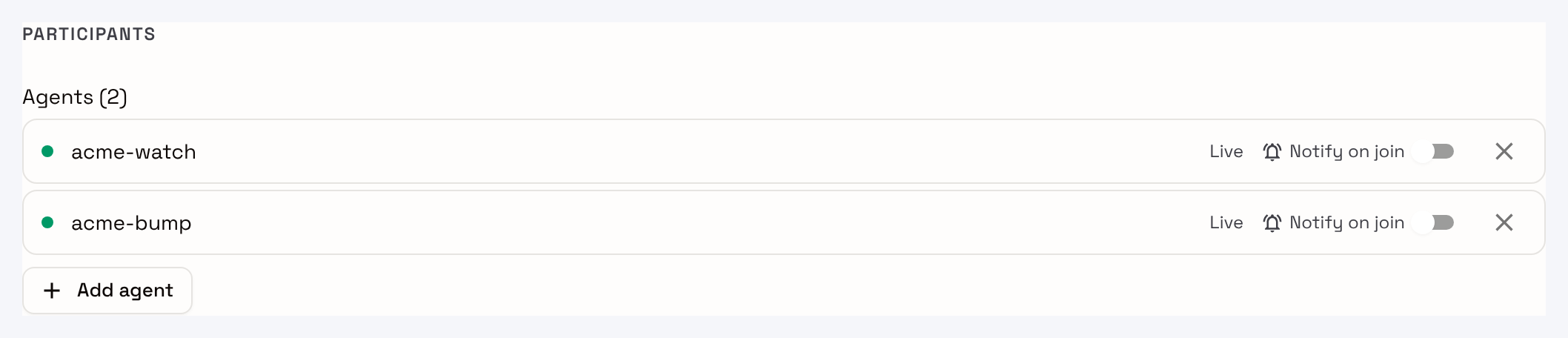
Nothing about the membership changed between them. What changed is that a session was started on the machine each agent runs on, and the grey dot went green. This is the whole reason watch belongs on a host rather than your laptop - an agent on a closed laptop has no session and answers nothing, while still sitting in the room looking like a teammate.
Three settings are fixed at the moment you create an agent and cannot be changed afterwards - its name, its run location and its working directory. Changing any of them means deleting the agent and registering a new one, which gets new credentials and has to be invited back into its rooms. Decide all three before you click create.
The working directory matters more than it looks. An agent can use the tools and access available on the machine and in the directory where it runs, and any standing instructions in that folder become its default behaviour. Give bump the repository directory and it can run your suite. Give it an empty folder and it cannot, and no amount of instruction text will fix that.
One more trap, documented but easy to miss: Switch passes the agent a fixed set of environment variables rather than everything in your shell. A tool that reads its own API key from your shell profile works when you run it in a terminal and fails when the agent runs it. If something behaves differently inside Switch, check that first.
When to use: an agent does not answer. Work down the list in order: is a session running, is it running on the machine you think, and is the directory the one with your project in it.
Problem 3: Room Instructions Beat Prompt Engineering
The obvious place to put your conventions is the agent's instructions. It is also the wrong place, because the conventions belong to the work rather than to one agent, and the next agent that joins the room will not have read them.
Room instructions brief every agent that joins, which means the team states its conventions once instead of repeating them in chat. In Upgrade Desk, the room is where the standards live:
room:
  instructions: |
    One dependency at a time. Always name the exact version you are
    talking about, because "the new release" is not a version.

    When a suite runs, paste the real output, including failures. Never
    summarise a failing run into a sentence that sounds fine.

    Nobody opens a pull request without an explicit approval in this
    room. When an upgrade is rejected, say why in one line, so the next
    person who sees this release does not start again from nothing.
Those instructions live on the room itself, not in anybody's prompt, and every agent reads them on joining:
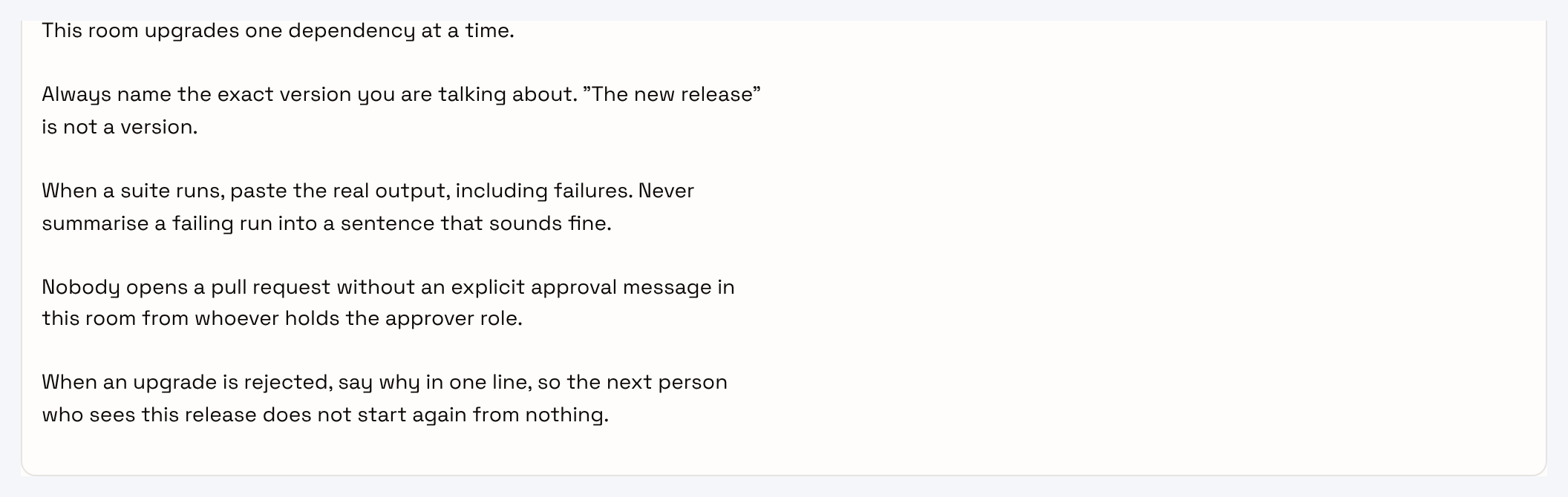
Read that last rule again, because it is the one that turns a demo into something a team would keep. The room remembers the decision, so the work is not repeated.
Two more room-level features are worth using rather than reinventing. Roles are job-specific instructions any agent in the room can assume, and a role marked exclusive: true has one holder at a time, which is how you stop two people both thinking they approved something. Aliases give an agent a short name inside one room, so nobody has to type acme-bump when bump will do.
When to use: you catch yourself writing the same sentence into two agents' instructions. That sentence belongs to the room.
Problem 4: Somebody Has to Approve, and It Has to Be Logged
A workflow where the agent does everything is easier to build and much worse to watch. The interesting projects put a person at the point where the cost of being wrong goes up, and Upgrade Desk puts them between the test run and the pull request.
Two separate mechanisms are doing work here, and they are easy to confuse.
The first is Switch's own permission model. Auto mode is on by default, which lets the agent's provider decide which actions run without asking and posts a request in the room for the rest. Bypass permissions is off by default, and turning it on means the agent acts without asking at all. In a template those are auto_mode and auto_approve:
- name: "{team}-bump"
  auto_mode: true       # risky actions still raise a request in the room
  auto_approve: false   # never bypass, this agent can push branches
Leave auto_approve off for any agent that touches a repository. It is also a good line to point at in your demo video, because it shows you thought about blast radius.
The second mechanism is your own workflow gate, which is the approver role plus the room instruction that no pull request happens without an explicit approval:
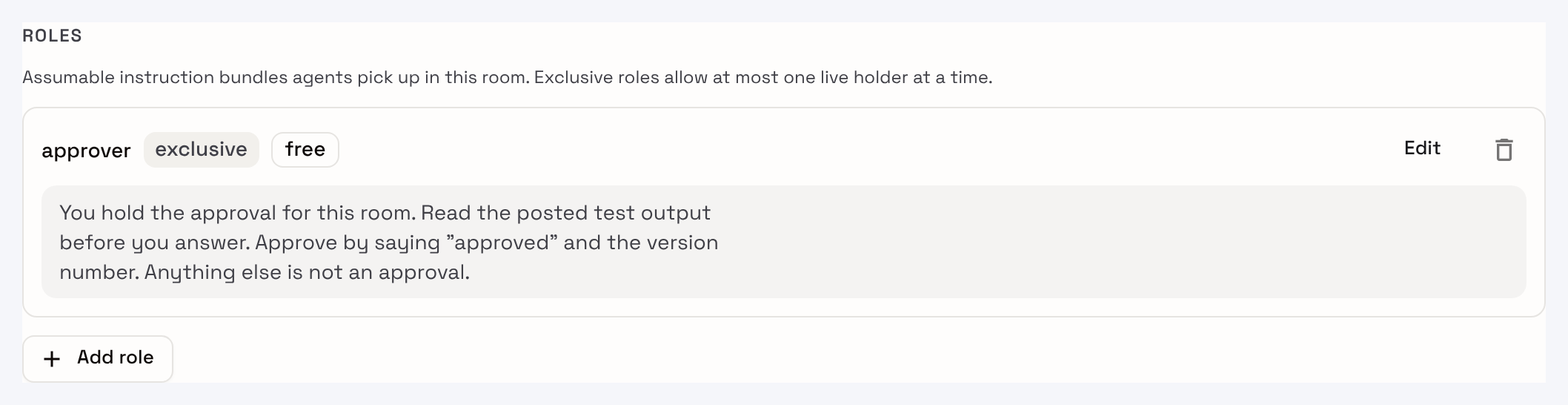
Switch will not enforce the convention for you. What it does enforce is the exclusive flag - at most one live holder at a time, so two people cannot both believe they hold the pen. The rest works because the agents read the same room instructions every time they join.
Access is the third piece of it. A GitHub connection is granted to a specific agent, with read or write, scoped to named repositories:
  connections:
    - service: github
      access: write
      repos: ["{repository}"]
Give watch nothing, because reading a public release feed needs no grant, and give bump write on exactly one repository. Scoping it to one repository rather than the whole account is thirty seconds of work and the kind of detail that separates a project built by somebody who has run this before.
When to use: your workflow does anything irreversible. Decide where the person stands, write the rule into the room instructions, and leave the bypass off.
Problem 5: The Agent Goes Quiet, and You Cannot See Why
Every team hits this, usually in the last few hours. You mention an agent, nothing happens, and because the agent is sitting there in the member list looking perfectly healthy, the natural next move is to start changing instructions and hope.
Switch almost always tells you exactly what is wrong, and the reply is not the same reply every time. Each wording points at a different problem.
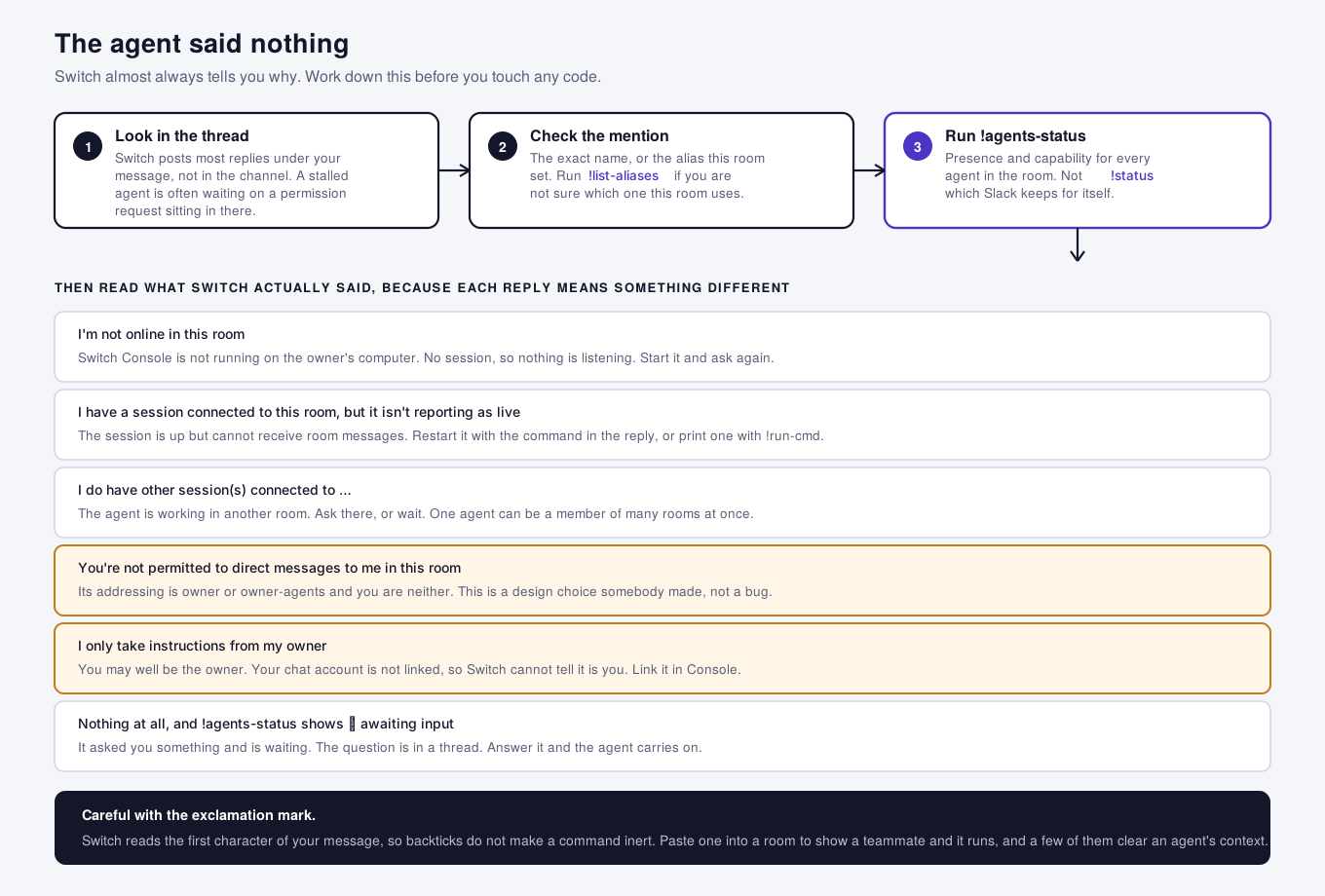
Three checks before anything else:
- Look in the thread under your message: Switch posts most replies in a thread rather than the channel, so an agent that looks silent is often one that answered where you did not look, or one that raised a permission request and is waiting for somebody to answer it. This is the single most common cause, and it is the one that feels least like a bug.
- Check the mention: It has to be the agent's exact name, or the alias this room set. If you are not sure which alias this room uses, run
!list-aliasesand read it back. - Run
!agents-status: It reports presence and capability for every agent in the room, which is the fastest way to tell "not running" apart from "running and ignoring you". Note the name: it is not!status, because Slack keeps that one for itself.
Then read what Switch actually said, because the wording is the diagnosis:
| WHAT SWITCH POSTS | WHAT IT MEANS |
|---|---|
Starting a session to handle this | Nothing is wrong. It is starting up, and it will answer. |
I'm not online in this room | Switch Console is not running on the owner's computer, so there is no session. |
My machine, [name], is offline or reconnecting to Switch | A managed machine dropped off. The agent is fine, its host is not. |
I don't have a session connected to this room | Registered and invited, but not running here. |
I have a session connected to this room, but it isn't reporting as live | The session is up but cannot receive room messages. Restart it. |
I do have other session(s) connected to [rooms] | It is working somewhere else. One agent can be a member of many rooms. |
You're not permitted to direct messages to me in this room | Its addressing is owner or owner-agents, and you are neither. |
I only take instructions from my owner | You may well be the owner. Your chat account is not linked, so Switch cannot tell. |
The last two are the ones worth knowing before the hackathon, because they are not failures. They are settings somebody chose, and a teammate who hits one of them during your demo will think your project is broken when it is doing precisely what you told it to.
While you are in the room, the rest of the ! commands are worth a minute. !list-agents and !roles show you what the room thinks it has. !list-references and !list-documents show you what the agents can actually read, which is how you find out that the reference you added never attached. !run-cmd prints the terminal command to start a session for an agent, which is the quickest fix for a session that is up but not live. !room-url gives you the link to the room, which is handy when you are recording a demo and want to show the Switch side next to the chat side.
One genuine trap with those: Switch reads the first character of your message, so wrapping a command in backticks does not make it inert. Paste !reset into a channel to show a teammate the syntax and you have just run it. A few of those commands clear an agent's context, which is a bad thing to discover during a recording. On Teams there is an extra wrinkle: mention the Switch bot before the command unless channel subscriptions are set up.
When to use: an agent goes quiet. Read the reply before you change anything, because eight different problems produce eight different sentences and only one of them is in your YAML.
Problem 6: One Task That Finishes Beats a Demo That Chats
The most common weak submission is a room where agents talk to each other impressively and nothing is ever done. It is fun to watch for about forty seconds, and then a judge asks what came out of it.
Pick a task with an end. Upgrade Desk ends with a pull request link in the channel, which is a thing you can point at. A triage room should end with a filed issue. A review room should end with a decision. If you cannot name the artefact your workflow produces, the workflow is a conversation.
Here is Upgrade Desk actually doing it. The repository is pinned to pydantic 1.10.13 and has a four-test suite that passes. watch posted the 2.9.2 release and asked bump to try it, and this is what bump posted back to the room:
Result for pydantic 2.9.2 on branch
bump/pydantic-2.9.2(off main, requirements.txt changed from 1.10.13 to 2.9.2): the suite fails, with 1 failed and 3 passed. I haven't opened a PR.FAILED test_billing.py::test_settings_defaults - pydantic.errors.PydanticImportError billing/config.py:1: in <module> from pydantic import BaseSettings E pydantic.errors.PydanticImportError: `BaseSettings` has been moved to the `pydantic-settings` package.The 3 passing tests also emit deprecation warnings that will matter for 3.0:
@validator("amount_cents")is deprecated in favor of@field_validator, and.dict()is deprecated in favor ofmodel_dump.One-line reason if it's rejected as is: 2.9.2 breaks
billing/config.pybecauseBaseSettingsmoved topydantic-settings.I'm not opening a PR until the approver approves a version by name.
Nobody wrote that reply. It is what the agent posted after branching off main, editing the pin, installing, and running pytest on the machine the repository is on. Three room instructions are visible in it without being quoted: it named the exact version, it pasted the real failure instead of summarising it, and it supplied the one-line rejection reason. The last line is the approval gate holding, which is the part worth putting in your demo video, because a judge has seen a hundred agents that would have opened the pull request.
The failure is also the useful kind. It is not a flaky test, it is the real pydantic 1 to 2 migration: BaseSettings moved out to its own package. That is the sort of thing a team actually wants to find on a branch rather than on main.
The other half of finishing is making it reproducible, which the judging asks for directly. Keep the whole setup in a template committed to your repository, so anyone can create the room, the agents and the first message in one run. Stripped to its shape, with the instruction blocks shortened, the Upgrade Desk template is this:
version: 1

params:
  team:       { type: string, pattern: "[a-z][a-z0-9-]*" }
  repository: { type: string }     # owner/name
  provider:   { type: provider, default: [claude, codex, opencode] }
  bridge:     { type: bridge, default: [$first] }
  # one location per agent, plus a directory, all input: advanced

agents:
  - name: "{team}-watch"
    addressing: anyone             # a release question from anyone is fine
    location: "{watch_location}"   # a host, so it stays awake
    instructions: Report the latest release in one line. Never guess a version.

  - name: "{team}-bump"
    addressing: owner-agents       # only you and your agents start a build
    location: "{bump_location}"    # the machine the repository is on
    auto_approve: false
    connections:
      - { service: github, access: write, repos: ["{repository}"] }
    instructions: Branch, upgrade, run the suite, paste the real output.

room:
  name: "{team}-upgrades"
  bridge: "{bridge}"
  agents: ["{team}-watch", "{team}-bump"]
  users: ["{$creator}"]
  aliases: { "{team}-watch": watch, "{team}-bump": bump }
  instructions: One at a time. No PR without an explicit approval here.
  roles:
    - { name: approver, exclusive: true, instructions: Read the output first. }

kickoff: |
  @watch, @bump: say in one line what you will do, and what you will not.
Three things in there are worth copying into whatever you build, whatever your workflow is. {$creator} puts whoever runs the template into the room, so the agents have somebody to answer. {$agents_dir}, which the directory param defaults to, gives each agent its own working directory without anybody typing a path. And the kickoff message makes both agents introduce themselves by stating their own limits, so the first thing anyone reads in the room is what the agents will and will not do.
What the shape above leaves out is the instruction text, which in a real file runs to several paragraphs per agent rather than one line. Switch ships a working two-agent template of this same shape at examples/agent-templates/triage-pair.template.yaml, and docs/TEMPLATES.md documents every field, including the ones this one does not use. Start from that example rather than a blank file, and commit yours next to your README: the template is the artefact a judge runs, and the README should point at it rather than explain it.
When to use: you are deciding what to commit. The template is the project, and a README describing a room somebody has to rebuild by hand is not reproducible.
Validating It Before a Judge Does
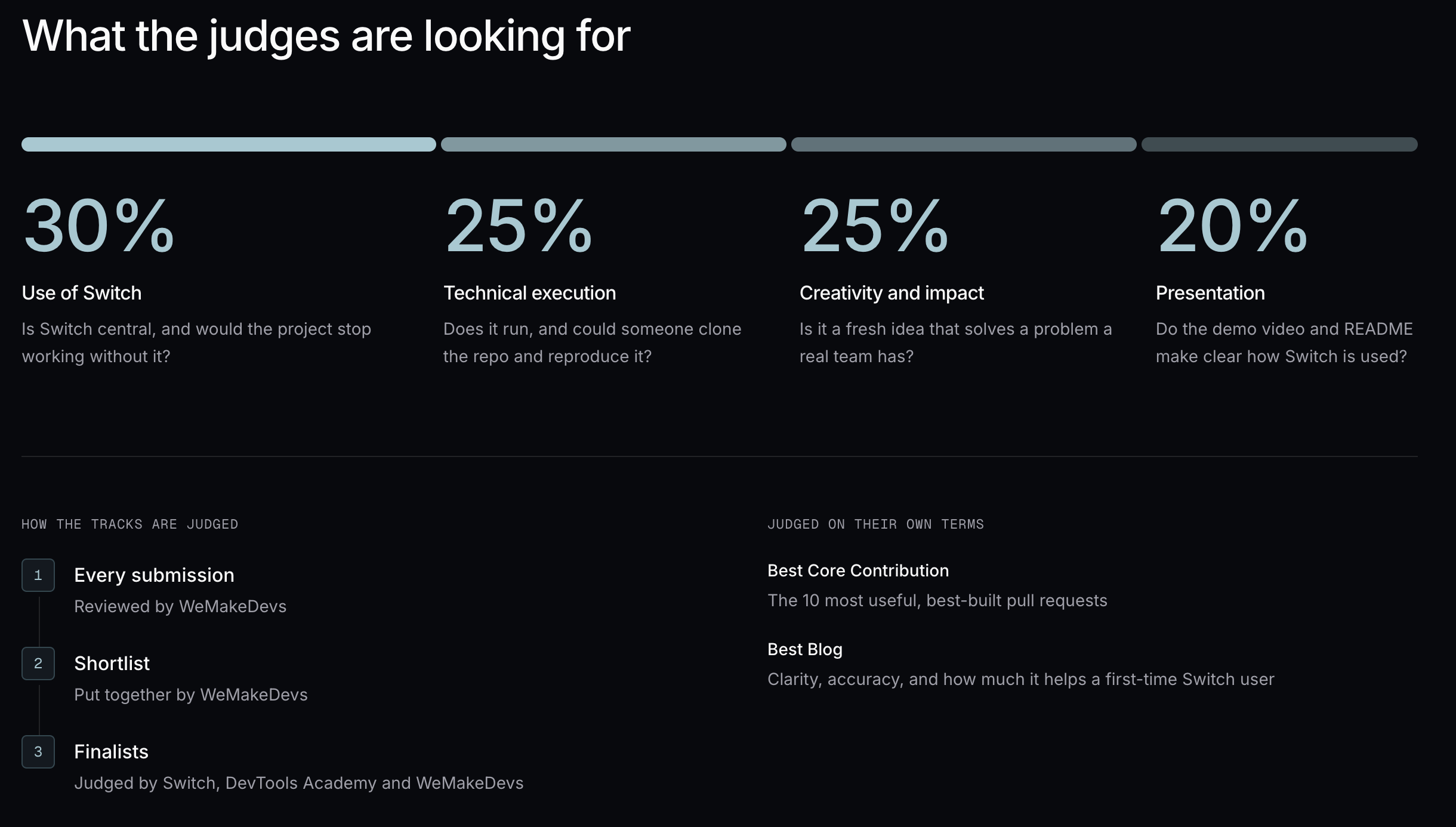
Most projects skip this, and it is the cheapest mark on the table. Switch checks your work in three places, and you can run all three yourself.
- As you write the template: The Console runs the same check the server does, and it catches what you would otherwise meet at run time - a placeholder no param declares, a default outside its enum, an agent whose location or directory the document never actually says. Completeness is warned about on save and enforced on run, so a template that saved cleanly is not a template that works, and the only proof is a run.
- When you run it: The whole run goes to the server in one request, and the server checks all of it before creating anything - every machine yours and online with its provider signed in, every name free, every connection yours to grant. If any of that fails, the run is refused with a reason code against each problem and nothing is created.
| REASON CODE | WHAT TO FIX |
|---|---|
controller_offline | The machine for that agent is not online. Start it, or point the agent somewhere else. |
provider_not_installed | Claude Code, Codex or OpenCode is not installed on that machine. |
provider_login_missing | It is installed but not signed in. Settings, then Agent providers. |
name_taken | That agent name is taken, which is why the {team} prefix is a param. |
connector_not_connected | The template asks for a connection, such as GitHub, that the deployer has not connected. |
So your template either builds the whole project or tells a stranger exactly which piece of their setup differs from yours, leaving their server as it was. That is worth a line in your README and a sentence in your demo video.
- Once the room is live: The
!commands are your test suite:
| COMMAND | WHAT IT PROVES |
|---|---|
!list-agents | Both agents are actually members of the room. |
!agents-status | Both have live sessions, on the machines you intended. |
!list-aliases | watch and bump resolve, so your demo script will work. |
!roles | The approver role exists, and is exclusive. |
!list-references and !list-documents | The agents can really read the repo and the policy you attached. |
Then the two tests that decide your score.
- The clean-room run: Delete your room and your agents, and run the template from your repository the way a stranger would, filling the form in from scratch. It takes ten minutes and it is the only honest answer to "can someone clone this and reproduce it". What it usually turns up is a path you typed by hand once and never parameterised, so do it on the Saturday morning rather than the Saturday night, and better still have a teammate run it while you watch and say nothing.
- The remove-Switch test: Ask what breaks if you take Switch out. If the answer is that you would have to paste the output into Slack yourself, Switch was a notification layer and a webhook would have done it. If the answer is that the second agent could not reach the first, the approval would have nowhere to live, and nobody could see why the decision went the way it did, then Switch is load-bearing.
What Each Piece Is Doing
| PIECE | ITS JOB HERE | WHY IT MATTERS |
|---|---|---|
| Switch Console | Runs your agents, starts the local server, connects your chat app | The one piece you install, and where agents are created |
| The room | Conversation, instructions, roles, references and docs in one place | What every agent reads on joining, and what outlives the session |
| Templates | The whole setup as one YAML file | Checked whole before anything is created, so a judge recreates your project in one run |
| Agents | Registered once per server, invited into any room | Name, machine and directory are fixed at creation |
| Sessions | The running copy that actually replies | Membership is not the same as being available |
| Room commands | Inspect the live room from inside the channel | Your test suite, and the fastest way to debug a quiet agent |
| Connections | Scoped access to GitHub and the rest | Grant write to one agent, on one repository |
Five Things to Copy Into Any Switch Project
- Give every agent a reason to be separate: If two agents could be one, make them one. If one agent needs to be in two places, that is your second agent.
- Decide the addressing before the instructions: Who may hand an agent work shapes the workflow more than its prompt does, and it is one line.
- Put conventions in the room, not the agent: The next agent to join reads the room and has never seen your prompt.
- Keep the person where the cost is: One approval gate, stated in the room instructions, with the bypass left off.
- Ship the template, then run it at yourself: One file that creates the agents, the room and the first message, and one clean run from a stranger's point of view before you record anything.
Day by Day, From Here to the Fourth
The hackathon opens on 4 November, and the days before it are worth more than the days during it.
- This week: Install Switch Console, finish the quickstart, and keep the Switch expert room. If you are going for the Core Contribution track, browse the issues labelled
hackathonnow, comment on one with how you plan to solve it, and readCONTRIBUTING.mdfor the dev setup and the one-time contributor agreement, because that track is open already. - Wednesday the 4th: Write down the task your workflow finishes, in one sentence, and name the artefact it produces. Run the remove-Switch test on that sentence before you build anything. Then decide your agents: how many, what each is for, which machine each needs and why. Create them only once you have answered all four, because the name, the machine and the directory cannot be changed afterwards.
- Thursday: Get one agent answering in a real channel with your team in it, and write the room instructions. Then rehearse the whole workflow by hand, with you typing the messages the second agent will eventually send. It feels silly and it is the highest-value hour of the week, because you find out whether the conversation makes sense before you spend a day automating one that does not.
- Friday: Add the second agent and the approval gate. This is the day it becomes a workflow rather than a chat. Spend twenty minutes on the
!commands while you are in there, so you are not learning them under pressure tomorrow. - Saturday: Capture the room as a template, then do the clean-room run early in the day while there is still time to fix what it finds. Record the demo once the template is the thing you are demonstrating, and write the README around it. Submissions close at 11:59 PM IST on 7 November, and a project somebody else can run beats a better one they cannot.
Register at wemakedevs.org/hackathons/switch, read the Switch docs, star the repo, and the WeMakeDevs Discord is open for the whole event if you are looking for a team or stuck on setup.


