
Introduction
The Agent Harness Hackathon runs from August 24–30, with $10,000 in prizes and interview opportunities with TrueFoundry.

If you have just registered, or you are finding the hackathon a little late, you are not behind. You do not need to spend hours learning every part of TrueForge before you start building.
This guide will take you from choosing the right problem to running your first agent, connecting real tools, executing code safely, and putting together a project that makes good use of the agent harness.
What Makes This Hackathon Different
The challenge is to build a useful AI agent with TrueForge, TrueFoundry’s open-source agent harness, and use Qodo throughout your development workflow to improve the quality of the code you ship.
We are not looking for another chat interface around an LLM. The interesting part of this hackathon starts when your model needs to move beyond generating an answer and interact with the real world:
- retrieving information from external tools
- working with APIs or other data sources
- executing generated code
- processing files or data
- delegating parts of a task to other agents
- carrying context across sessions
- stopping and asking a human before taking an important action
TrueForge gives you the runtime for doing this through MCP tools, skills, sandboxing, approvals, subagents, context management, and persistent sessions.
Alongside it, Qodo helps you make sure the code behind that agent is something you would actually want to ship. Connect it to your repository, work through pull requests, review what it finds, and fix meaningful issues as you build.
The Gap We Want You to Solve
LLMs are already very good at explaining what someone should do. The harder problem is building an AI system that can reliably do the work.
Think about how engineers use AI today: they share a production issue and ask what they should check next. The harder problem is building an agent that can move beyond giving debugging advice and actually investigate the issue.
Or suppose you are building a research agent: it might need to gather information from several sources, delegate parts of the research, process the results, generate a report, and remember the work when the user comes back later.
The model is only one part of both systems. You also need the infrastructure around it to connect tools, execute work safely, manage context, delegate tasks, and keep a human in control when needed.
That is where TrueForge comes in. But getting the agent to work is only half of the job.
Once your project starts connecting several tools, agents, prompts, APIs, and pieces of application logic, the codebase can get messy very quickly. That is why Qodo is also part of the hackathon. It reviews your changes with context from the wider repository, helping you catch issues and improve the code as you build.
So the challenge is really about both sides of building an agent:
Can your agent do something genuinely useful, and have you built it in a way that someone else could understand, review, and continue working on?
What can you build?
A good place to start is with a workflow where someone currently has to gather information, make decisions, move between multiple tools, or manually perform a series of actions.
Then ask whether an agent could take over a meaningful part of that workflow.
Here are a few examples 👇🏻
-
A developer operations agent:
Give it a failed deployment or production issue. The agent could inspect relevant systems through MCP tools, split parts of the investigation between subagents, run diagnostic code inside a sandbox, prepare a suggested fix, and ask the developer before taking a sensitive action.
As you build it, Qodo can review changes to the repository and help catch problems in the code that connects all of those pieces.
-
A research agent:
Give it a company, technology, market, or topic to investigate. It could gather information through external tools, assign separate research tasks to subagents, process the findings, and keep the research context available when the user returns later.
The final project should not only produce a good report. The repository should also make it clear how the research workflow, tools, prompts, and application logic fit together.
-
A data workflow agent:
Give it files or data that need to be cleaned, analyzed, or transformed. The agent could collect the inputs, generate the required code, execute it inside a sandbox, inspect the output, and decide what to do next.
This is a good example of where the sandbox is not being added because it is a hackathon feature. It is there because the agent genuinely needs somewhere safe to execute work.
-
An engineering workflow agent
Give it a development task and the agent could gather repository context, use external engineering tools, run or test code inside an isolated environment, and ask the developer before actions that should not happen automatically.
Since the project itself is about software development, this is also a natural place to use Qodo throughout the pull request workflow instead of waiting until submission day.
-
An operations agent
Take a workflow that normally involves several tools, decisions, and repetitive steps.
The agent could gather the required information, follow reusable instructions through skills, perform safe actions automatically, and stop whenever the workflow needs human confirmation.
These are only examples and you do not need to build one of them. The important part is the pattern behind them - the agent should be doing work, not simply generating an answer.
TrueForge

TrueForge is an open-source agent harness that provides the runtime layer for turning an LLM into a working agent.
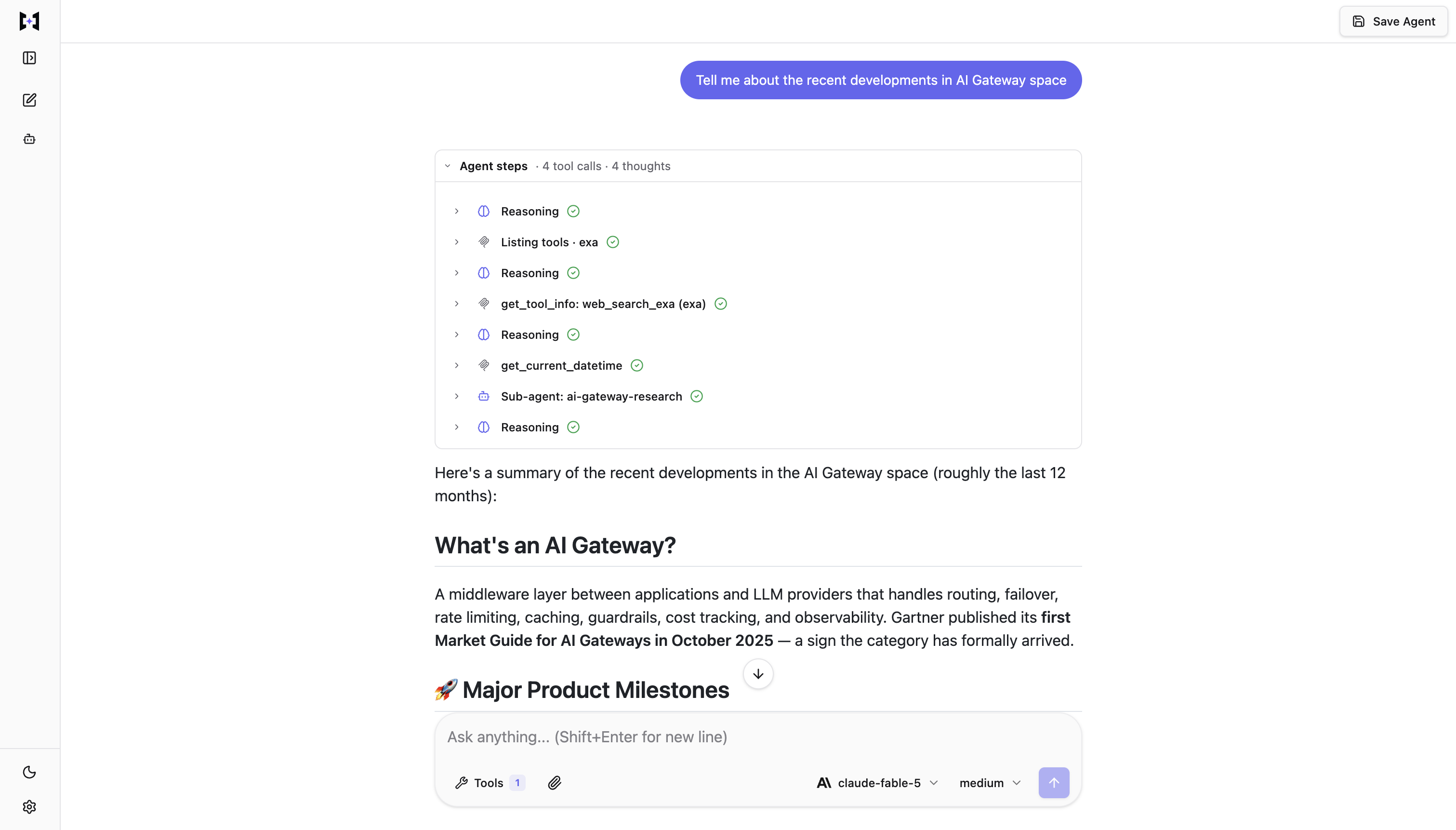
It brings together the pieces an agent needs to operate beyond a chat window: MCP tools, skills, sandboxing, approvals, subagents, context management, and persistent sessions.
Want to see what’s possible with TrueForge?
Check out the TrueForge Example Agents, a collection of ready-to-use agent examples covering security auditing, research, codebase onboarding, CI fixes, database analysis, issue triage, incident investigation, and more. You can use these examples as starting points and adapt them for your own hackathon project.
Resources
DOCS
- Agent harness docs: what it is, and what it handles for you.
- Connect a model: pointing the harness at a provider
- Configure MCP servers: the tools your agent can reach
- Star TrueForge on GitHub
ONCE IT IS RUNNING FOR REAL USERS
Steps to build your first agent using TrueForge
Using TrueForge, you can go from an empty workspace to a reusable agent that can connect to external tools, execute code, use skills, and delegate work to subagents.
You can run TrueForge locally with a single command and build your agent directly from the browser.
In this guide, we'll walk through the process of setting up TrueForge, connecting a model and tools, adding a skill, configuring a sandbox, and creating your first reusable agent.
Let's get started:
Step 1. Run TrueForge
TrueForge requires Node.js 22 or newer.
For local development, you can start TrueForge with:
npx @truefoundry/trueforgeNo additional infrastructure is required for local mode. TrueForge runs as a single process and stores its data in SQLite.
Once it starts, open:
http://localhost:8790Local mode is intended for personal use on your machine, so keep it on localhost rather than exposing it directly to the internet.
Step 2. Add a model provider
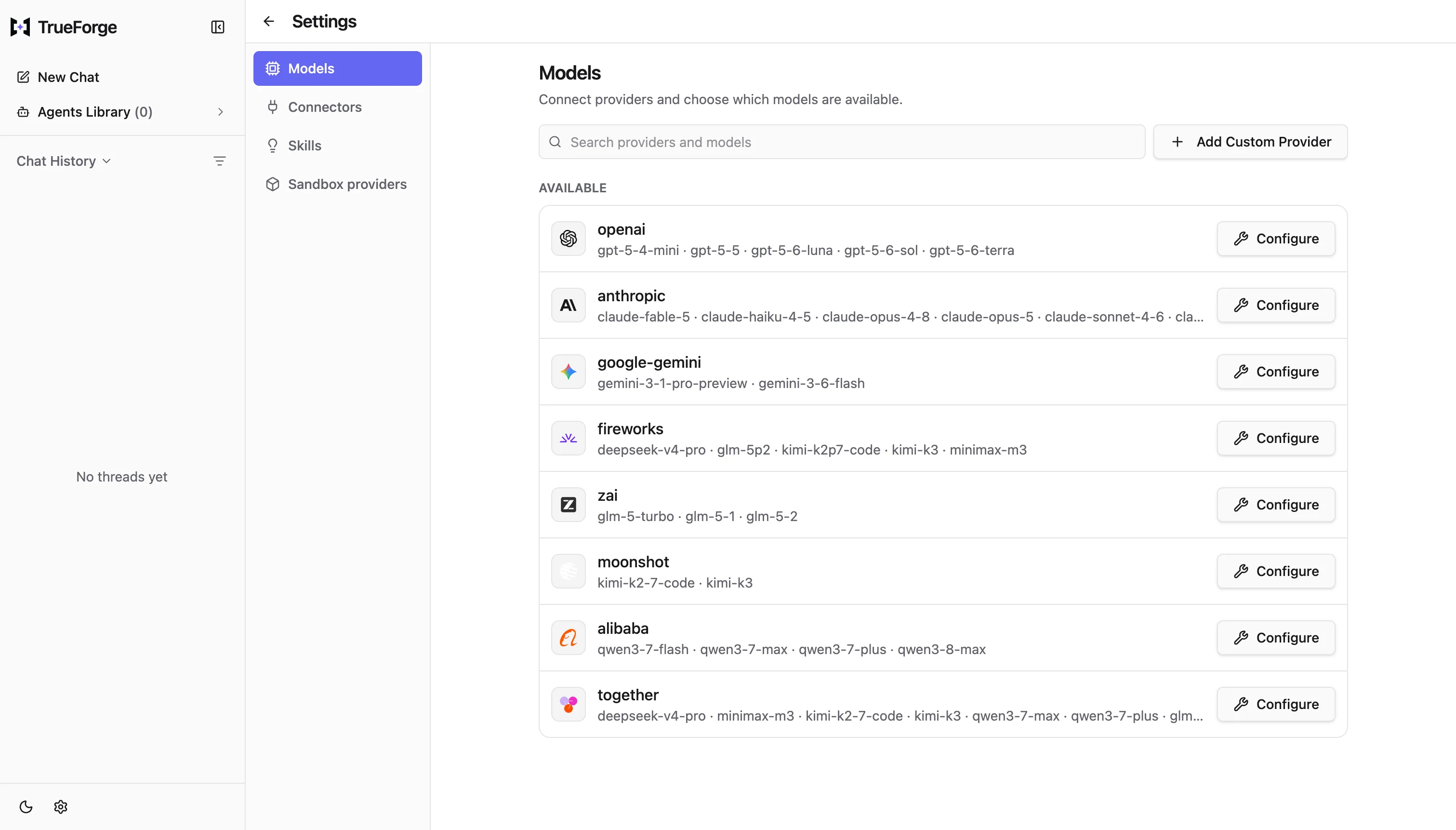
Once TrueForge is running, open Settings → Models.
Choose a model provider from the catalog and configure it with your API key.
After you create the provider, its available models will immediately become selectable when you create or run an agent.
Step 3. Connect a tool with MCP
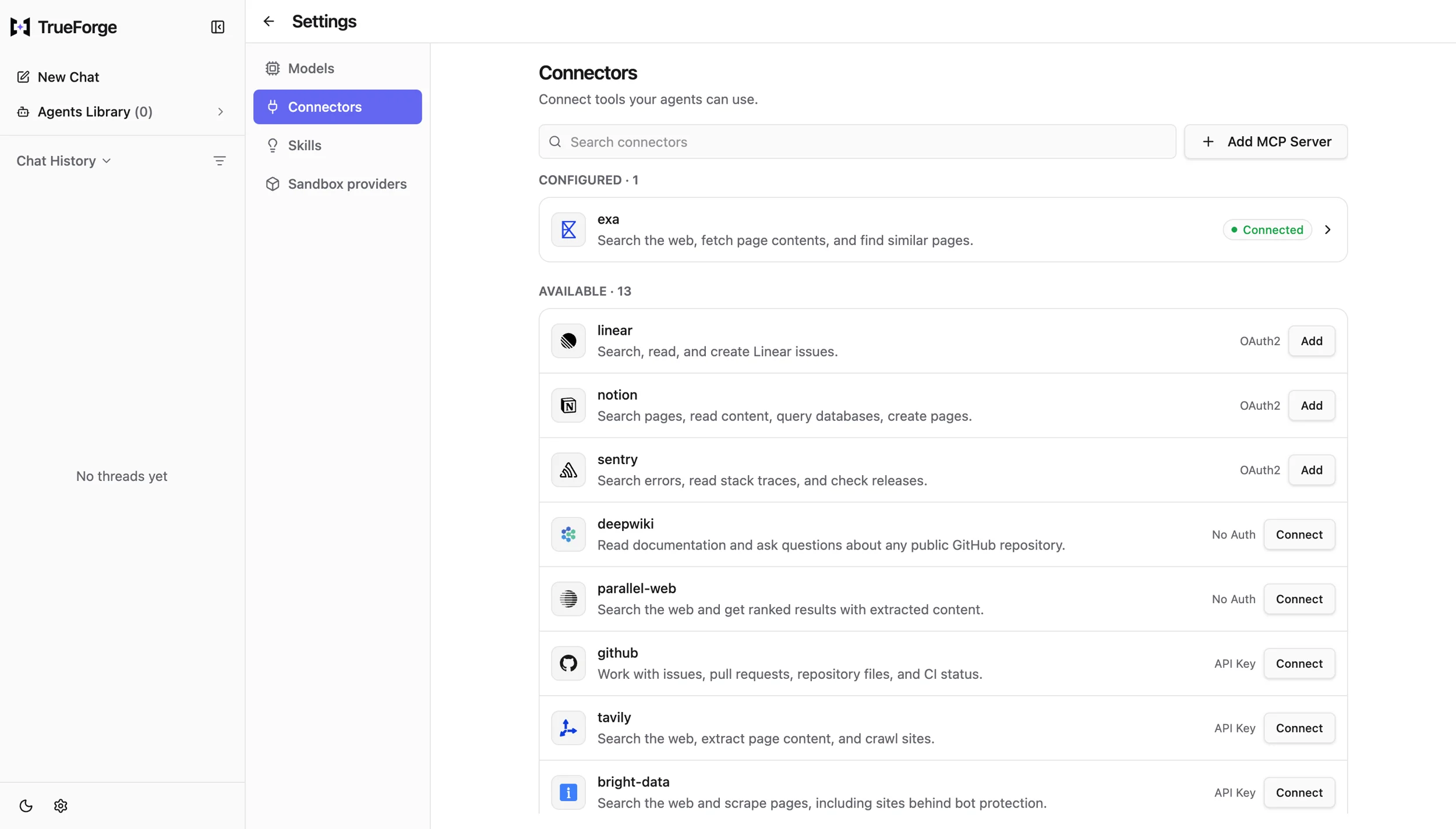
TrueForge uses Model Context Protocol (MCP) servers to connect agents to external tools and data.
Open: Settings → Connectors
From there, you can connect an MCP server from the built-in catalog or add your own server by URL. Once connected, your agent can use the tool during its execution instead of simply telling you how you could use it.
Step 4. Add a skill
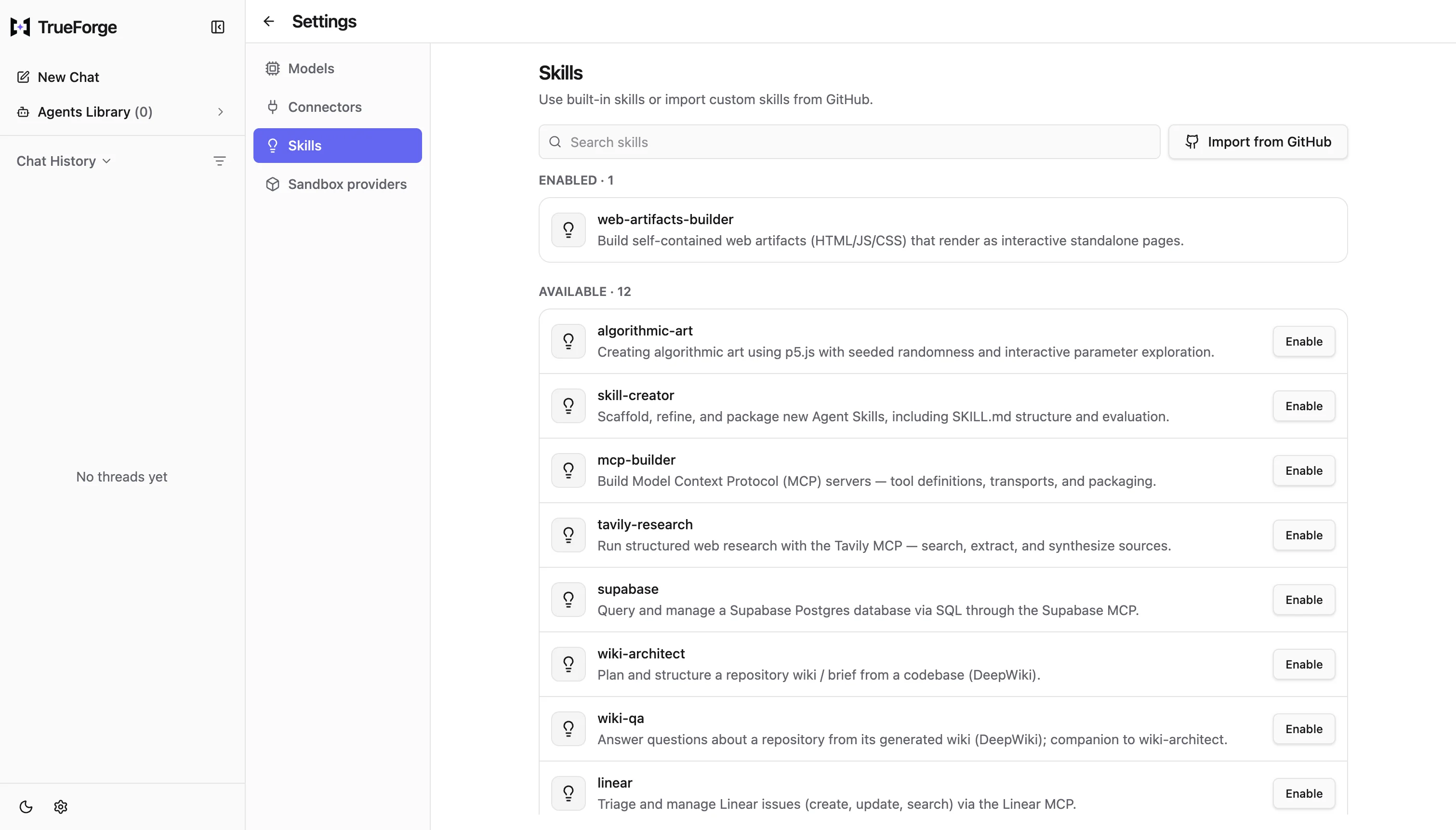
Tools give an agent capabilities. Skills give it reusable instructions for using those capabilities.
Open: Settings → Skills
TrueForge skills are git-backed SKILL.md instruction packs that the agent can load when a task requires them.
You can enable one from the built-in list or import a skill from GitHub.
Step 5. Add a sandbox
Giving an agent the ability to write and execute code is powerful, but running generated code directly on your machine can be risky.
That's why TrueForge treats the sandbox as a tool.
The agent can request a sandbox when it needs to execute code, work with files, or use capabilities that require an isolated environment.
TrueForge currently supports Daytona as a sandbox provider.
To configure it:
- Create a Daytona API key with the required permissions.
- Open Settings → Sandbox providers.
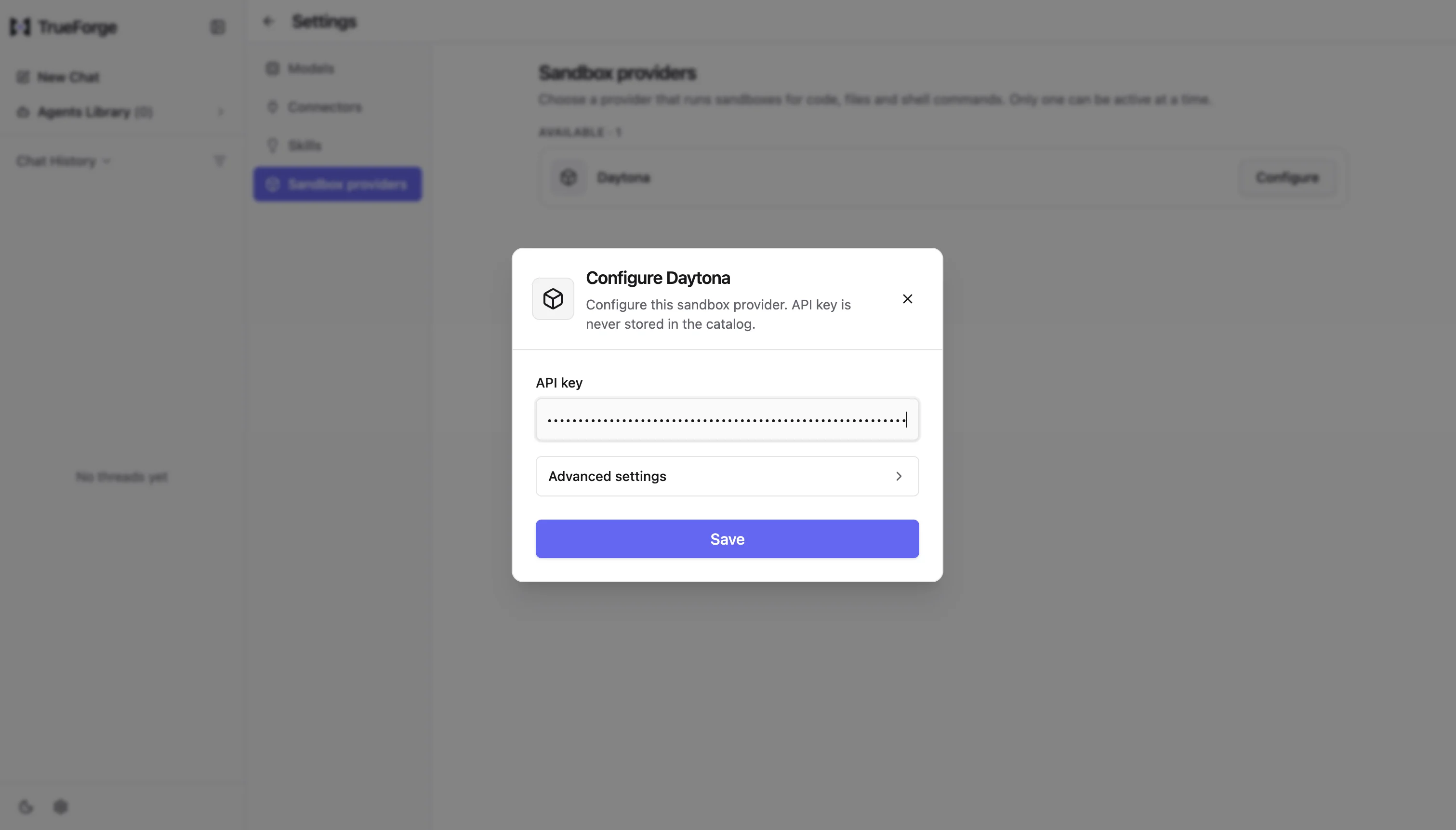
- Select Daytona.
- Add your API key.
- Save the configuration.
Now your agent has somewhere isolated to execute the code it generates.
Step 6. Compose your agent
Go back to the chat and start composing your agent.
Choose your model, then open the Tools menu and configure the capabilities your agent needs.
You can enable:
- Connectors for external tools and data
- Skills for reusable instructions
- Dynamic sub-agents for parallel work
- Sandbox capabilities for executing code
Step 7. Save your agent
Once you've built an agent that works, save it as a reusable agent.
Click Save Agent and give it a name and instructions.
Your model, connectors, skills, and instructions are captured together.
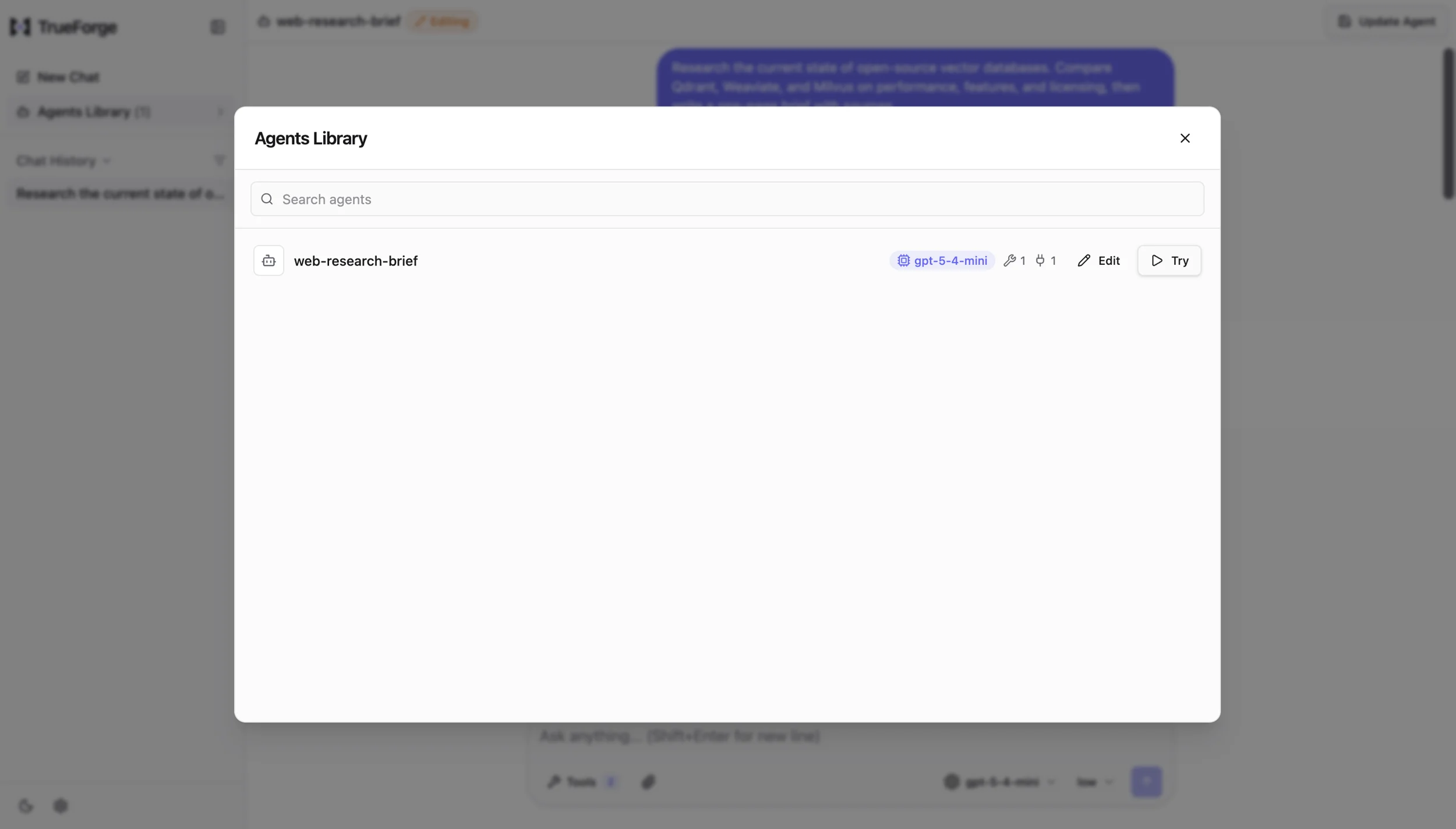
You can then find the agent in the Agents Library and start a new session whenever you need it.
Qodo
Qodo is an AI code review platform that reviews your code with context from the entire repository, rather than looking at a pull request diff in isolation. It understands repository structure, dependencies, and history to surface bugs, risks, and standards violations.
You can use Qodo across your development workflow, including pull requests, IDEs, CLI, and Git workflows.
Resources
DOCS
TUTORIALS
- Intro to Qodo
- Getting started with the Qodo Gen VS Code extension
- The review tool, on a real pull request
MORE TUTORIALS
- The describe tool: pull request descriptions, written for you
- Getting started with the Qodo Command, and building agents with it
- Qodo in action: a full walkthrough with best practices
- All of Qodo's tutorials
Let's get started:
Step 1. Create your Qodo account
Head over to app.qodo.ai/signin and sign in using Google, GitHub, or email.
If your team has already invited you, open the "Join your team: enjoy Qodo" email and accept the invitation before signing in.
Step 2. Connect your Git account
Once you're signed in, Qodo's setup wizard will guide you through connecting your development environment.
- Start by linking your Git account so Qodo can identify you across pull requests and commits.
- Then install the Qodo app on the repository you're using for the hackathon.
- This gives Qodo access to analyze your code and surface review findings on your pull requests.
Step 3. Connect your tools
You can also connect your task management tools to link code changes with the issues and tasks they belong to.
Qodo supports integrations with tools such as Jira, Linear, and Azure DevOps.
Step 4. Open a pull request
Once Qodo is connected to your repository, open a pull request. Qodo automatically reviews changes in your linked repositories and can:
- Apply your team's coding standards
- Surface bugs, risks, and violations
- Explain and prioritize findings
- Analyze changes using context from the entire codebase
Instead of treating your PR as an isolated diff, Qodo looks at how the changes fit into the rest of your project.
Step 5. Fix what Qodo finds
This is where Qodo becomes particularly useful for the hackathon. Run your pull request through Qodo, review the findings, and address the issues before merging.
Qodo Code Review Guide
To get started quickly with The Agent Harness Hackathon, your first milestone should be simple: get your project into a GitHub PR and run it through Qodo Code Review before merging. 🛠️
Here’s the workflow👇
Step 1: Set up Qodo for your hackathon repository.
One teammate with GitHub admin access can do this once for the entire team.
Log in to Qodo → Integrations → SaaS → GitHub → Add installation → Connect your GitHub account → Authorize your hackathon repository.
Step 2: Create a branch and open a GitHub pull request.
Your important code changes should go through a PR so Qodo can review them before you merge.
⚠️ Direct pushes to main do not count as reviewed work.
Step 3: Let Qodo review your PR.
Qodo should automatically start reviewing your PR. If it doesn’t, comment: /agentic_review
Fix valid High-severity findings. If a finding is incorrect, intentionally deferred, or expected behavior, dismiss it in the Qodo thread and explain why.
Medium and Low findings can be handled based on your engineering judgment.
Step 4: Push your fixes and get a follow-up review.
After making changes, push them to the same PR and run: /agentic_review again if needed.
You can also use Qodo Agent Skills with Codex or another compatible coding agent to help resolve findings: npx skills add qodo-ai/qodo-skills/skills
Then use the qodo-pr-resolver skill to review and fix the findings.
Step 5: Add your review proof to the README.
Create a section called: Qodo Code Review Evidence
This section should include: • A link to at least one representative merged PR with meaningful hackathon code • 1–2 lines explaining what Qodo found and what you changed or intentionally dismissed • The PR history showing the Qodo review and follow-up review
🔎 The public PR link is the required proof.
Screenshots can add context, but they cannot replace the public PR. Judges may also check other important merges to make sure Qodo was part of your development process and not just a one-time step.
💡 If Qodo doesn’t respond, first check that the GitHub App has access to your repository and that the repository is active in Qodo. You can also comment /agentic_review on the PR.
The prizes

We're giving $10,000 in prizes, including an NVIDIA DGX Spark, a Mac Mini, Keychron Keyboard, Logitech MX Master 3, and job interviews at Truefoundry.
1. 🏆 Grand Prize: Double-O Track
NVIDIA DGX Spark - $5,000 value
Awarded for the Best Use of TrueForge.
The judges will look at how effectively you use the harness: real MCP tools, sandboxed code execution, human approvals, subagents, persistent sessions, and other TrueForge capabilities.
2. 🤖 Q Branch Track
Mac Mini
Awarded for Best Code Quality.
Build something that looks like real software, not just a hackathon demo.
Using Qodo is required to win this track. Run your pull requests through Qodo, address what it finds, and make your repository something another developer could clone, understand, and extend.
3. 🌐 Universal Exports
Job interviews at TrueFoundry
The top projects can earn an interview with the team behind TrueForge.
There is nothing to apply for and no separate track to enter.
4. ✍️ Field Report
Keychron Keyboard
Awarded for Best Blog Post.
Tell the story of what you built.
Explain the problem you chose, how you built the agent, how TrueForge helped, what broke along the way, and what you learned.
5. ⭐ Calling Card
Logitech MX Master 3
Star the TrueForge GitHub repository and enter the draw.
💡 No project required. Just star the repo and you'll have a chance to win.
6. 📡 Radio Traffic
Swag for the Top 10 Social Posts
Share what you're building throughout the hackathon.
Post a clip of your agent working, share something surprising, talk about a bug you encountered, or show the progress you're making.
Tag WeMakeDevs and TrueFoundry so we can find your posts.
Connect With Us
If you're a company building tools, platforms, or services for developers and want to reach a large and active developer community, we’d love to collaborate.
Visit our website or send us an email on contact@wemakedevs.org
Follow us and join our newsletter or technical groups for global events, resources and amazing opportunities: https://www.wemakedevs.org


